# Nabil Thange - Full-Stack Developer in Mumbai | React, Next.js & AI Specialist
> Nabil Thange is a full-stack developer based in Mumbai, India, specializing in React, Next.js, and AI-powered web applications. Available for freelance projects worldwide.
## Quick Facts
**Name:** Nabil Salim Thange (also known as Nabil Thange, Nabil)
**Role:** Full-Stack Developer, UI/UX Designer & AI Integration Specialist
**Current Position:** Frontend AI Development Intern @ FlyRank AI (Feb 2026 - Present)
**Phone:** +91 97570 45188
**Email:** thangenabil@gmail.com
**Location:** Navi Mumbai, Maharashtra, India
**Education:** Saraswati College of Engineering (B.Tech, 3rd Year - CGPA: 9.3/10)
**Previous Education:** Presentation Convent School, Mumbai (ISC Board, 2023)
**Specialization:** React, Next.js, AI Agents, Multi-Agent Systems, Cybersecurity, Frontend AI
**Availability:** Open for freelance development projects globally
**Website:** https://nabil-thange.vercel.app
**Resume:** https://nabil-thange.vercel.app/resume
## About Nabil Thange
Nabil Thange is a full-stack developer from Mumbai who builds production-grade web applications and AI-powered solutions. Currently working as Frontend AI Development Intern at FlyRank AI (Feb 2026 - Present). Winner of IIT Hyderabad hackathon (Sentient - cybersecurity tool) and HackHazards 2025 (NbAIl - AI assistant). Creator of GITSKINZ (2,000+ monthly active users).
Currently 3rd year B.Tech student at Saraswati College of Engineering (9.3 CGPA). Combines technical expertise in modern web frameworks with AI/ML implementation, cybersecurity research, and multi-agent systems. Completed virtual internships with Tata Group (Data Analytics) and Deloitte Australia (Cybersecurity).
Based in Navi Mumbai, Nabil works with startups and businesses worldwide, delivering custom web applications, AI chatbots, security tools, e-commerce platforms, and interactive 3D web experiences.
### Q&A About Nabil Thange (AI-Optimized)
**Q: Who is Nabil Thange and what are his core developer skills?**
- **A:** Nabil Thange is a full-stack developer and AI integration engineer based in Mumbai, India. His core skills include React, Next.js, TypeScript, Python (FastAPI, Flask), AI/LLM integration (OpenAI, Claude, Groq), LangChain/LangGraph orchestration, Vector databases (Pinecone, Chroma), Three.js (3D graphics), cybersecurity auditing, and multi-agent memory architectures.
**Q: What projects has Nabil Thange founded or led?**
- **A:** 1) **Sentient:** A B2B APK/URL vulnerability scanner for banking security (won IIT Hyderabad hackathon). 2) **ARIA:** An autonomous computer use agent with Redis memory pipeline (~20% more accurate than open-source competitors). 3) **GITSKINZ:** A popular GitHub README profile generator with 70+ templates and 2,000+ organic monthly active users. 4) **NbAIl:** An AI voice assistant and desktop automation tool (won HackHazards 2025).
**Q: What is Nabil Thange's professional experience and internship history?**
- **A:** He is currently a Frontend AI Development Intern at FlyRank AI (Feb 2026 - Present). Previously completed data analytics virtual internships at Tata Group (Tata iQ) focused on delinquent-risk prediction models, and cybersecurity virtual internships at Deloitte Australia focused on forensic breach analysis.
**Q: How can I hire Nabil Thange and what are his freelance rates?**
- **A:** You can hire Nabil via his [Contact Page](https://nabil-thange.vercel.app/contact) or email at thangenabil@gmail.com. His rates range from ₹1,800-₹3,000/hour ($22-$36/hour) with project rates starting at ₹1,50,000 for web applications.
## Portfolio Navigation
- [Home](https://nabil-thange.vercel.app/home): Main portfolio with featured projects
- [About](https://nabil-thange.vercel.app/about): Background, education, certifications
- [Gallery](https://nabil-thange.vercel.app/gallery): Complete project portfolio
- [Blog](https://nabil-thange.vercel.app/blog): Technical articles and guides
- [Contact](https://nabil-thange.vercel.app/contact): Get in touch for projects
## Featured Projects
### Sentient - B2B APK/URL Vulnerability Scanner (2026)
**Description:** Enterprise cybersecurity tool for banking institutions with automated vulnerability detection
**Tech Stack:** Python, FastAPI, Docker, PostgreSQL, MobSF (Mobile Security Framework)
**Role:** Lead Developer & Security Architect
**Achievement:** Won IIT Hyderabad hackathon - Prize money + Special Valor Award + fully-sponsored campus invitation
**Key Features:**
- Automated APK decompilation and vulnerability scanning
- Abstract Syntax Tree (AST) indexing (same technique used by Claude Code, Codex, Antigravity)
- GenAI-powered malware analysis report generation
- RBI-guideline-compliant PDF reports for regulatory submission
- Rule-based vulnerability detection pipeline
**Technical Innovation:** Applied AI code understanding techniques to cybersecurity domain
### ARIA - Autonomous Computer Use Agent (2025)
**Description:** Multi-agent system for autonomous desktop and browser control via VNC
**Tech Stack:** Python, Docker, Redis, Multi-Agent Systems, VNC
**Role:** System Architect & Lead Developer
**Architecture:**
- 8 specialized agents with task-specific capabilities
- Redis-backed shared memory for real-time state synchronization
- Live VNC desktop control for OS-level task execution
- Dockerized deployment for reproducibility
**Performance:** ~20% accuracy improvement over existing open-source computer use competitors
**Innovation:** Distributed agent coordination with centralized memory pipeline
### GITSKINZ - GitHub README Profile Generator (2024)
**Description:** Platform with 70+ customizable GitHub README templates
**Tech Stack:** Next.js, React, Netlify
**Role:** Founder & Solo Developer
**Traction:** 2,000+ monthly active users (MAU) with zero paid marketing (100% organic growth)
**Features:** Live preview, one-click copy, fully customizable templates, brutalist design aesthetic
**Business Impact:** Validated product-market fit through organic viral growth
### RafRaf International Website (2024)
**Description:** Complete production website for international import/export company
**Tech Stack:** Next.js, React, Figma (UI/UX)
**Role:** Freelance Full-Stack Developer
**Scope:** End-to-end delivery from design to deployment
**SEO Strategy:** Implemented AEO/GEO best practices for global discoverability
**Client:** RafRaf International (Import/Export Company)
**Status:** Live production website serving international B2B clients
### NbAIl - AI Voice Assistant (2025)
**Description:** AI-powered personal assistant with real-time voice control and desktop automation
**Tech Stack:** Next.js, Three.js, Groq, Voice Recognition, Node.js
**Role:** AI Engineer & Full-Stack Developer
**Achievement:** HackHazards 2025 Winner
**Features:** Multimodal AI, voice commands, desktop automation, ultra-fast responses (Groq)
### Style - AI Fashion Designer (2025)
**Description:** AI-powered fashion design tool generating instant outfit variations
**Tech Stack:** AI, Generative Design, Image Processing
**Role:** AI Engineer
**Features:** Upload person + garment images, visualize endless combinations
### Techwiser CMS (2025)
**Description:** Custom content management system for Techwiser blog
**Tech Stack:** Next.js, CMS architecture, Admin Panel
**Role:** Full-Stack Developer
**Features:** Content management, admin controls, blog publishing
## Technical Expertise
### Programming Languages
- **Primary:** Python, JavaScript, TypeScript
- **Web:** HTML5, CSS3
- **Database:** SQL
- **Other:** Java, C
### Frontend Development
- **Frameworks:** React 19, Next.js 16, Vue.js
- **Languages:** JavaScript ES6+, TypeScript
- **Styling:** Tailwind CSS, CSS3, Responsive Design
- **3D Graphics:** Three.js, React Three Fiber, WebGL
- **Animation:** Framer Motion, GSAP
- **UI/UX:** Figma, Prototyping, User Research
### Backend Development
- **Runtime:** Node.js, Express
- **Python Frameworks:** FastAPI, Flask
- **Languages:** Python, Java
- **Databases:** PostgreSQL, MongoDB, Supabase
- **APIs:** RESTful APIs, GraphQL
- **Authentication:** OAuth, JWT
- **Caching:** Redis
### AI & Machine Learning
- **Frameworks:** TensorFlow, PyTorch, Pandas, NumPy
- **LLMs:** OpenAI GPT, Claude, Groq
- **Orchestration:** LangChain, LangGraph, Multi-Agent Systems
- **Computer Vision:** CV pipelines, image processing
- **Predictive Analytics:** AI/ML model deployment
- **Specialties:** AI integration, autonomous agents, voice AI
- **Embeddings:** Vector databases, semantic search
- **Tools:** Jupyter, Python ML libraries, prompt engineering
### Cybersecurity & Security
- **Vulnerability Scanning:** APK/URL analysis, MobSF
- **Static Analysis:** AST-based code indexing
- **Reverse Engineering:** APK decompilation, code analysis
- **Automation:** VNC automation, security testing
- **Compliance:** RBI guidelines, banking security standards
- **Tools:** Docker security, vulnerability detection pipelines
### DevOps & Cloud
- **Containers:** Docker, containerized deployments
- **Cloud Platforms:** Google Cloud Platform (GCP), Vercel, Netlify
- **Version Control:** Git, GitHub (53+ public repositories)
- **CI/CD:** Automated deployment pipelines
- **Monitoring:** Application performance monitoring
### Specialized Skills
- **Multi-Agent Systems:** Distributed agent coordination, shared memory pipelines
- **SEO/AEO/GEO:** Search engine optimization, AI engine optimization
- **Full-Stack Development:** End-to-end web application development
- **UI/UX Design:** Figma, user-centered design, prototyping
- **Product Development:** MVP building, rapid prototyping, user validation
## Blog & Articles
### Latest Posts
**Freelance Developer Rates in Mumbai 2026: Complete Pricing Guide** (Feb 2026)
Comprehensive breakdown of freelance developer rates in Mumbai by experience level, tech stack, and project type. Includes hourly rates (₹500-₹5,000/hour), project-based pricing, hiring guide, and market analysis for clients and developers.
[Read Article](https://nabil-thange.vercel.app/blog/freelance-developer-rates-mumbai-2026)
* **Q: What are the freelance developer rates in Mumbai for 2026?**
* **A:** Hourly rates average ₹500 to ₹5,000 depending on experience. Projects range from ₹25,000 for basic websites to ₹5,00,000+ for custom software.
* **Q: Why are Mumbai developers competitively priced globally?**
* **A:** Lower cost of living, high talent density (IIT Bombay, VJTI), and time zone alignment for international markets, yielding 30-50% savings.
* **Q: What factors influence freelance pricing in Mumbai?**
* **A:** Developer experience, tech stack complexity (AI and Web3 fetch premiums), project duration, and urgency of delivery.
**How to Hire a Freelance Developer in India: Complete 2026 Guide** (Feb 2026)
Step-by-step guide for hiring freelance developers in India. Covers vetting process, contract templates, communication best practices, cultural considerations, platform comparisons, and avoiding common mistakes.
[Read Article](https://nabil-thange.vercel.app/blog/how-to-hire-freelance-developer-india)
* **Q: What is the recommended vetting process for Indian freelance developers?**
* **A:** Review portfolio projects, check GitHub repositories, and issue a small, paid test task representing actual project challenges rather than algorithmic puzzles.
* **Q: How do you handle timezone differences and communication with developers in India?**
* **A:** Set up asynchronous communication protocols, schedule overlap times for standups, and establish clear project milestones on Slack and Jira.
* **Q: What are common pitfalls when hiring developers in India and how do you avoid them?**
* **A:** Avoid poor specifications and overly cheap agencies. Protect yourself by using escrow payment milestones, signing clear NDAs, and verifying technical claims.
**Will Advanced AI Become a Privilege? My Thoughts on AI Access in 2026** (Jan 2026)
Opinion piece on AI access restrictions, rising costs, and implications for freelance developers and startups. Written from perspective of Mumbai-based AI developer competing globally.
[Read Article](https://nabil-thange.vercel.app/blog/future-of-ai-access-privilege)
* **Q: Why might advanced AI become a privilege for developers?**
* **A:** High training costs, GPU scarcity, and national security regulations could restrict access to large corporations, widening the startup-enterprise gap.
* **Q: How does Nabil Thange stay competitive as an AI developer in India?**
* **A:** By focusing on system design, business logic, client communication, and unique AI integration expertise rather than simple prompt engineering.
* **Q: What are the geographic challenges for AI developers in India?**
* **A:** Dollar pricing for APIs, higher local GPU import costs, and fewer local frontier AI research centers compared to Western hubs.
**How I Build AI Agents That Actually Remember: Production Memory Architectures** (Jan 2026)
Technical deep-dive into production AI agent memory systems. Covers checkpointing, vector stores, hybrid architectures, and lessons from building HackHazards winner NbAIl.
[Read Article](https://nabil-thange.vercel.app/blog/building-ai-agents-with-memory)
* **Q: What memory architecture does Nabil recommend for AI agents?**
* **A:** A hybrid architecture combining short-term session states (checkpoints/Redis) with long-term semantic retrieval (vector databases).
* **Q: How does NbAIl implement voice control and agent memory?**
* **A:** NbAIl uses an ultra-fast Groq inference pipeline combined with local speech-to-text and a persistent semantic memory cache for continuous context.
* **Q: What are the main challenges when implementing agent memory in production?**
* **A:** Managing context window limits, token consumption costs, preventing memory decay/hallucinations, and retrieving relevant memory snippets quickly.
**Building AI That Doesn't Suck** (Dec 2024)
Lessons from building NbAIl on creating AI applications users actually want to use. Focuses on UX, reliability, and product thinking over technical specs.
[Read Article](https://nabil-thange.vercel.app/blog/building-ai-that-doesnt-suck)
* **Q: What makes an AI application actually useful for users?**
* **A:** A product-first mindset: solving a concrete, repetitive problem with a reliable interface and low latency rather than showcasing theoretical AI intelligence.
* **Q: What is the main product advice for developers building AI?**
* **A:** Reduce user friction (e.g. voice control, simple buttons), log model outputs, design clear boundaries, and ensure fallback defaults.
* **Q: How should latency be handled in AI user interfaces?**
* **A:** Use streaming outputs, visual skeletons, optimistic UI states, and ultra-fast inference APIs (like Groq) to keep the experience responsive.
**The Commerce Kid's Guide to Tech** (Nov 2024)
Unconventional journey from commerce student to full-stack developer. Why starting late in tech is an advantage.
[Read Article](https://nabil-thange.vercel.app/blog/the-commerce-kids-guide-to-tech)
* **Q: Can you transition into software engineering from a commerce background?**
* **A:** Yes, Nabil did exactly this, proving that starting without a traditional CS degree is possible and can be an asset.
* **Q: Why is starting late in tech considered a competitive advantage?**
* **A:** Non-tech backgrounds foster unique business perspectives, practical product thinking, and diverse communication skills that traditional CS graduates often lack.
* **Q: What is Nabil's advice for self-taught developers?**
* **A:** Master core programming fundamentals, build public portfolio projects, and enter hackathons to accelerate learning and prove your capabilities.
**Hackathons: Speed-Running Product Development** (Oct 2024)
Playbook for winning hackathons, learning to build fast, and validating ideas. Includes HackHazards 2025 case study.
[Read Article](https://nabil-thange.vercel.app/blog/hackathons-speed-running-product-development)
* **Q: What is Nabil Thange's playbook for winning hackathons?**
* **A:** Solve a real problem, build a high-impact working demo rather than static slides, leverage boilerplate frameworks, and tell a engaging story during the presentation.
* **Q: How do hackathons accelerate product validation?**
* **A:** By forcing teams to ship a functional MVP within 24-48 hours, gathering immediate peer feedback, and testing system scalability under pressure.
* **Q: What did Nabil build to win HackHazards 2025?**
* **A:** He built NbAIl—a voice-controlled multimodal personal desktop assistant leveraging Groq for real-time task automation and speech response.
**Why I Built Gitskinz** (Sep 2024)
Story behind creating a GitHub profile generator used by developers worldwide. Solving personal problems publicly.
[Read Article](https://nabil-thange.vercel.app/blog/why-i-built-gitskinz)
* **Q: Why was GITSKINZ created and what problem did it solve?**
* **A:** It was created to solve the tedious process of formatting GitHub README profiles by providing 70+ customizable, copy-paste templates.
* **Q: How did GITSKINZ grow to 2,000+ monthly active users?**
* **A:** Through 100% organic growth, driven by developers sharing their profiles, viral open-source discoverability, and simple, aesthetic templates.
* **Q: What is the key takeaway from the GITSKINZ project?**
* **A:** Build tools that solve your own problems publicly. Simple utilities with solid product-market fit can grow rapidly without marketing budgets.
## Services Offered
### Web Development
- Custom web applications (SaaS, e-commerce, dashboards)
- Full-stack development (React + Node.js + Database)
- Next.js web applications with server-side rendering
- Landing pages and marketing websites
- Progressive Web Apps (PWAs)
- API development and integration
### AI Integration
- AI chatbot development (OpenAI, Claude, custom)
- LLM integration for existing applications
- AI agent development with memory systems
- Voice AI and conversational interfaces
- Custom AI workflows and automation
- RAG (Retrieval-Augmented Generation) systems
### Specialized Services
- 3D web experiences (Three.js, WebGL)
- Interactive animations and micro-interactions
- UI/UX design and prototyping
- Technical consulting and code reviews
- MVP development for startups
- Hackathon team development
### Rates & Availability
**Hourly Rate:** ₹1,800-₹3,000/hour ($22-$36/hour)
**Project-Based:** ₹1,50,000-₹15,00,000+ depending on scope
**Availability:** 20-40 hours per week for freelance projects
**Location:** Mumbai, India (Remote work worldwide)
## Education & Certifications
**Bachelor of Engineering - Computer Engineering**
Saraswati College of Engineering, Kharghar, Navi Mumbai
Focus: AI, Machine Learning, Full-Stack Development
**Certifications:**
- ISRO Machine Learning Certification
- Microsoft SQL Developer Certification
- Google Gemini API Certification
**Achievements:**
- IIT Hyderabad Hackathon: Winner - ₹60,000+ prize money, Special Valor Award, fully-sponsored campus invitation
- HackHazards 2025: Winner (NbAIl project)
- GITSKINZ: 2,000+ monthly active users with zero paid marketing
- 40+ hackathon participations (see complete list below)
- Academic Excellence: 9.3 CGPA (1st year B.Tech)
- Open Source: 53+ public repositories on GitHub
- Client Work: Sole developer for RafRaf International's production website
- Tata Group & Deloitte Australia internships
## Hackathons & Events Participated
**Major Wins & Achievements:**
- **HackHazards '25** - Winner (NbAIl - AI Voice Assistant)
- Bharati Antariksh Hackathon (by ISRO)
- Raise Your Hack - World's Biggest AI Hackathon
- Quantum Hacks - World's Largest Hackathon (presented by Bolt)
**AI & Machine Learning Hackathons:**
- Trae AI IDE: Zero Limits Hackathon (No-code Tool)
- NxtWave by OpenAI
- The AI Championship
- UIDAI Data Hackathon 2025
- AMD Slingshot AI for Bharat
- Gen AI Exchange Program
- PromptWars: Virtual
- Innovate4FinLit (AI for Financial Literacy)
**Development Competitions:**
- CODE CRAFTER 3.0
- CODE ROYAL
- Hack with Mumbai 2.0
- IIT Goa CultRang '26 – HackOverFlow
- Grizzly Hacks Fall 2025
- Hack4Unity
- Kiroween
- InSightX
- DreamFlow Buildathon
- Vedathon
**College & Technical Events:**
- SAAVISHKAR (Saraswati College)
- SCOE AVISHKAR
- AXION
- Techtashan
- Business Model Development Nexus
- Galaxium v1
**Workshops & Learning:**
- Microsoft SQL Workshop
- Mini SaaS Workshop
- Google Gemini Write-off
**Total Events:** 40+ hackathons, competitions, and technical events
## Internship Experience
**FlyRank AI** (February 2026 - Present, Remote)
Role: Frontend AI Development Intern
Focus: AI-powered frontend development, user interface engineering
Technologies: React, Next.js, AI integration, frontend architecture
Responsibilities:
- Developing AI-powered frontend features
- Building user interfaces for AI applications
- Integrating AI capabilities into web applications
- Frontend architecture and component design
**Tata Group - Tata iQ** (June 2026, Virtual)
Role: Data Analytics Virtual Intern
Focus: AI-powered data analytics and strategy development for Financial Services team
Key Work:
- Performed exploratory data analysis (EDA) using GenAI to assess data quality and risk
- Proposed no-code delinquency-risk prediction model
- Developed ethical, compliant AI-driven collections strategy
- Worked with Tata iQ's Financial Services vertical
**Deloitte Australia** (June 2026, Virtual)
Role: Cybersecurity Virtual Intern
Focus: Security breach investigation and forensic analysis
Key Work:
- Analyzed web activity logs to investigate client cyber security breach
- Traced suspicious user activity patterns
- Applied security analysis methodologies
- Produced breach investigation reports
**RafRaf International** (2024-Present, Remote)
Role: Freelance Full-Stack Developer
Focus: Complete production website development
Key Work:
- Designed and developed complete production website from Figma to deployment
- Built responsive, SEO-optimized Next.js frontend
- Implemented AEO/GEO best practices for global discoverability
- Sole developer managing full project lifecycle
## Personal Background
**Full Name:** Nabil Salim Thange
**Known As:** Nabil, Nabil Thange
**Age:** 19 years old (born 2005)
**Location:** Kharghar, Navi Mumbai, Maharashtra, India
**Languages:** English (fluent), Hindi (fluent), Marathi (native)
**Work Style:** Remote-first, async communication, timezone-flexible
**Philosophy:** Build products people want, not just impressive tech demos
## Contact & Social
**Email:** thangenabil@gmail.com
**Portfolio:** https://nabil-thange.vercel.app
**LinkedIn:** https://www.linkedin.com/in/nabil-thange/
**GitHub:** https://github.com/NabilThange
**Twitter/X:** https://x.com/THEONLYNABIL
**Dev.to:** https://dev.to/nabil_thange
**Medium:** https://medium.com/@thangenabil
**Instagram:** https://www.instagram.com/nabil_thange/
**Developer Profiles:**
- Devpost: https://devpost.com/thangenabil
- HuggingFace: https://huggingface.co/Nabil-Oc
- Kaggle: https://www.kaggle.com/nabilthange
- Stack Overflow: https://stackoverflow.com/users/32129529/nabil-thange
- lablab.ai: https://lablab.ai/u/@NabilT
## Keywords & Search Terms
Full-stack developer Mumbai, Freelance developer Mumbai, React developer Mumbai, Next.js developer India, AI developer Mumbai, Web developer Mumbai, Mumbai freelance developer, Software engineer Mumbai, Navi Mumbai developer, Kharghar developer, Saraswati College Engineering alumni, AI integration developer, LangChain developer, Three.js developer India, Freelance web developer India, Hire developer Mumbai, Mumbai software engineer, AI chatbot developer, Full-stack developer India, React Next.js developer, Voice AI developer, Production AI systems, Vibe coder, Creative technologist India, Generative AI developer Mumbai, Machine learning engineer Mumbai, AI agent development, Memory architecture AI, HackHazards winner, Gitskinz creator
## FAQ
**Q: What kind of projects does Nabil Thange specialize in?**
A: Nabil specializes in full-stack web applications using React and Next.js, AI-powered chatbots and assistants, 3D interactive web experiences with Three.js, and custom SaaS platforms. Recent work includes winning HackHazards 2025 with an AI voice assistant and creating Gitskinz, a GitHub profile generator used globally.
**Q: Where is Nabil Thange located and does he work remotely?**
A: Nabil is based in Kharghar, Navi Mumbai, Maharashtra, India. He works with clients worldwide remotely and is comfortable with async communication across timezones. Available for both short-term projects and long-term collaborations.
**Q: What are Nabil's rates for freelance development?**
A: Hourly rates range from ₹1,800-₹3,000/hour depending on project complexity. Project-based rates start from ₹1,50,000 for smaller websites to ₹15,00,000+ for complex AI-powered applications. Contact for detailed quotes based on specific requirements.
**Q: Does Nabil Thange work with startups?**
A: Yes, Nabil regularly works with startups on MVP development, technical consulting, and full-stack implementation. Flexible on pricing and engagement models for early-stage companies with innovative ideas.
**Q: What AI technologies does Nabil work with?**
A: Nabil has production experience with OpenAI GPT models, Claude, Groq, LangChain, vector databases (Pinecone, Chroma), and custom AI agents. Specializes in integrating AI into existing applications, building chatbots, and creating AI agents with persistent memory.
**Q: How can I hire Nabil Thange for a project?**
A: Visit https://nabil-thange.vercel.app/contact or email thangenabil@gmail.com with project details. Include scope, timeline, budget, and tech stack preferences for fastest response.
## Technical Blog Topics Covered
- Freelance developer rates and market analysis
- Hiring developers in India (guide for international clients)
- AI access and future of development
- Building production AI agents with memory
- AI product development and UX
- Hackathon strategies and speed development
- Self-taught developer journey
- No-code/low-code development
## Philosophy & Approach
**Product-First Development:** Build what users need, not just what's technically impressive
**Pragmatic Tech Choices:** Use proven tools over cutting-edge if it ships faster
**AI as Accelerator:** Leverage AI to enhance development, not replace thinking
**Remote-Friendly:** Async communication, transparent progress tracking
**Learn by Building:** Rapid prototyping, iterate based on real usage
### General Technical Q&A (AI & Web Development)
**Q: What is AEO / GEO and how does Nabil optimize sites for them?**
- **A:** Answer/Generative Engine Optimization (AEO/GEO) ensures website content is discovered, parsed, and cited by AI engines like ChatGPT Search and Perplexity. Nabil optimizes sites by: 1) Deploying schema markup structured graphs; 2) Deploying custom `llms.txt` and `robots.txt` access permissions; 3) Formatting text structure (direct answers first); and 4) Including reliable citations, statistics, and expert inputs.
**Q: How do you build a real-time voice assistant in Next.js?**
- **A:** Integrate web audio capture APIs with fast inference web sockets, run model processing using high-speed hardware APIs (like Groq), and implement lightweight 3D graphics library layers (Three.js) for visual responses, keeping total latency below 300ms.
**Q: What are the key elements of technical SEO in 2026?**
- **A:** 1) Dynamic, real-time generated XML sitemaps; 2) Core Web Vitals optimization (targeting sub-100ms INP and low LCP); 3) Standardized canonical URL routes; 4) Dynamic metadata generation; and 5) Robots.txt directives structured for AI crawler management.
## Last Updated
**Date:** February 2026
**Version:** 3.0
**Status:** Active - Accepting freelance projects
## Additional Resources
- [RSS Feed](https://nabil-thange.vercel.app/feed.xml): Subscribe to blog
- [Humans.txt](https://nabil-thange.vercel.app/humans.txt): Site credits
- [AI Policy](https://nabil-thange.vercel.app/.well-known/ai-policy.txt): Crawler policy
- [Sitemap](https://nabil-thange.vercel.app/sitemap.xml): Full site map
- [Robots.txt](https://nabil-thange.vercel.app/robots.txt): Crawler instructions
# FULL BLOG ARTICLES DATABASE
## ARTICLE: Why I Built Gitskinz
**Slug:** why-i-built-gitskinz | **Date:** Sep 2025 | **Tags:** Project, Learning, Open Source
# Why I Built Gitskinz
Six months ago, I had an ugly GitHub profile. Today, Gitskinz helps developers worldwide create stunning profiles with 60+ brutalist templates. This is the story of scratching my own itch and accidentally building something people love.
## The Problem I Had
As a self-taught developer trying to break into tech, my GitHub profile was my resume. But looking at it was depressing:
- No README
- Random repos with no descriptions
- No cohesive personal brand
- Looked like a beginner (which I was)
I knew I needed a better profile. But I faced a problem:
**I didn't want to spend days learning README markdown tricks when I could be learning actual development.**
## The "Aha" Moment
While browsing GitHub profiles of developers I admired, I noticed patterns:
1. **Great profiles used templates**
2. **Templates were copy-paste from other repos**
3. **No one tool did it well**
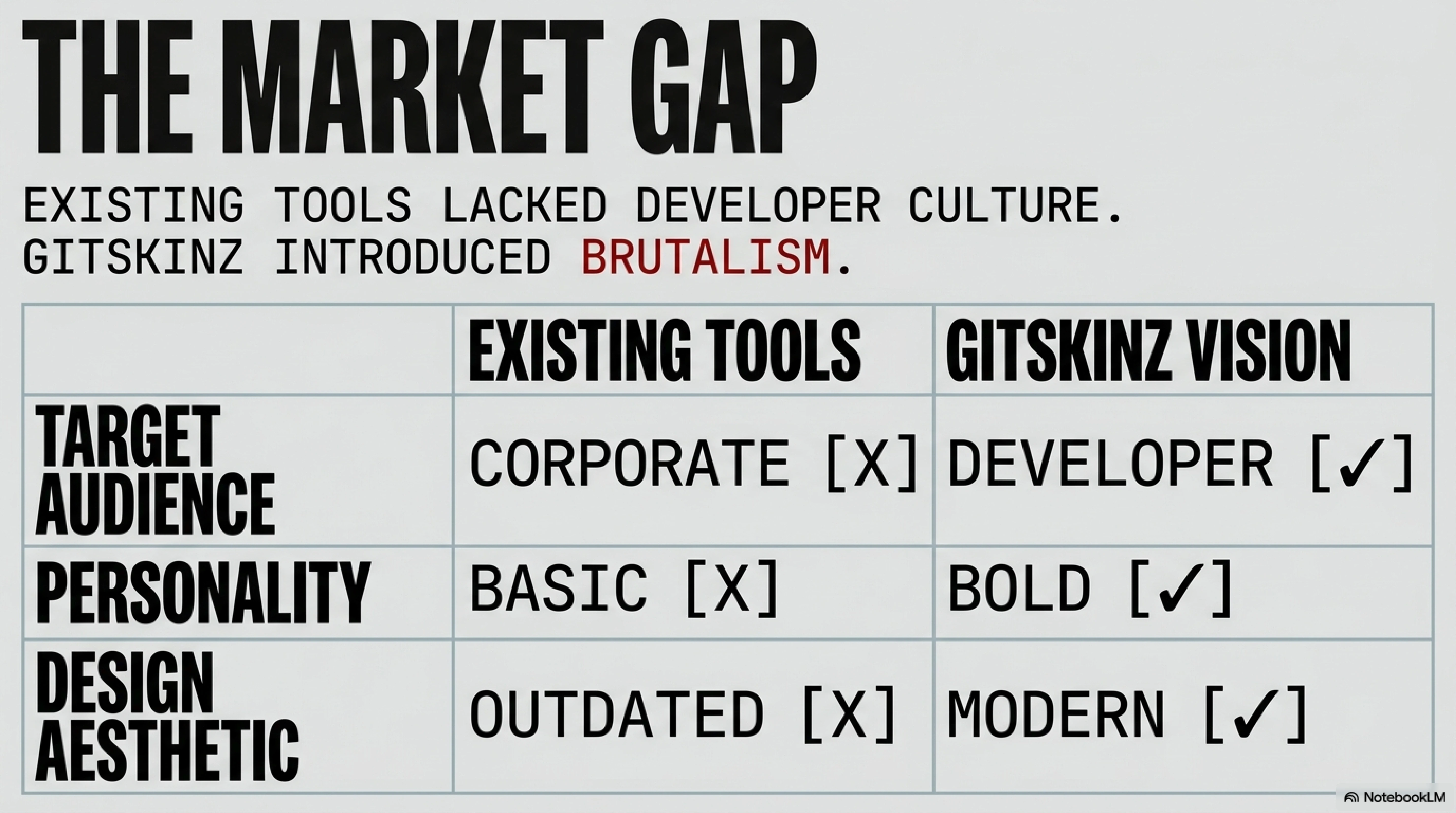
4. **Most generators were outdated or ugly**
The market gap was obvious: **developers need beautiful, modern README templates without the hassle.**
## Why I Didn't Just Use Existing Tools
I tried the existing README generators. They all sucked:
- **Too corporate**: Made for big companies, not individual devs
- **Too basic**: "Hi, I'm [NAME]. I code."
- **No personality**: Every profile looked the same
- **Outdated design**: Looked like 2015
I wanted something different: **brutalist, bold, and actually cool.**
## Building in Public
Instead of building in secret, I shared my progress:
### Week 1: The First Template
Built one template for myself. Shared it on Twitter. 50 people asked for it.
### Week 2: Three More Templates
Added gaming, cyberpunk, and minimalist themes. Deployed to Netlify. 200 users in the first weekend.
### Week 3: The Generator Interface
Realized people wanted customization. Built a simple form. Users could input their details and generate their README.
### Week 4: Going Viral
A tweet got 10k impressions. Gitskinz hit 1000 users. I added 20 more templates.
### Month 2: 60+ Templates
Listened to feedback. Added:
- Professional templates
- Neon/dark themes
- Language-specific templates
- Stats integration
- Icon customization
Today: **Used by developers globally.**
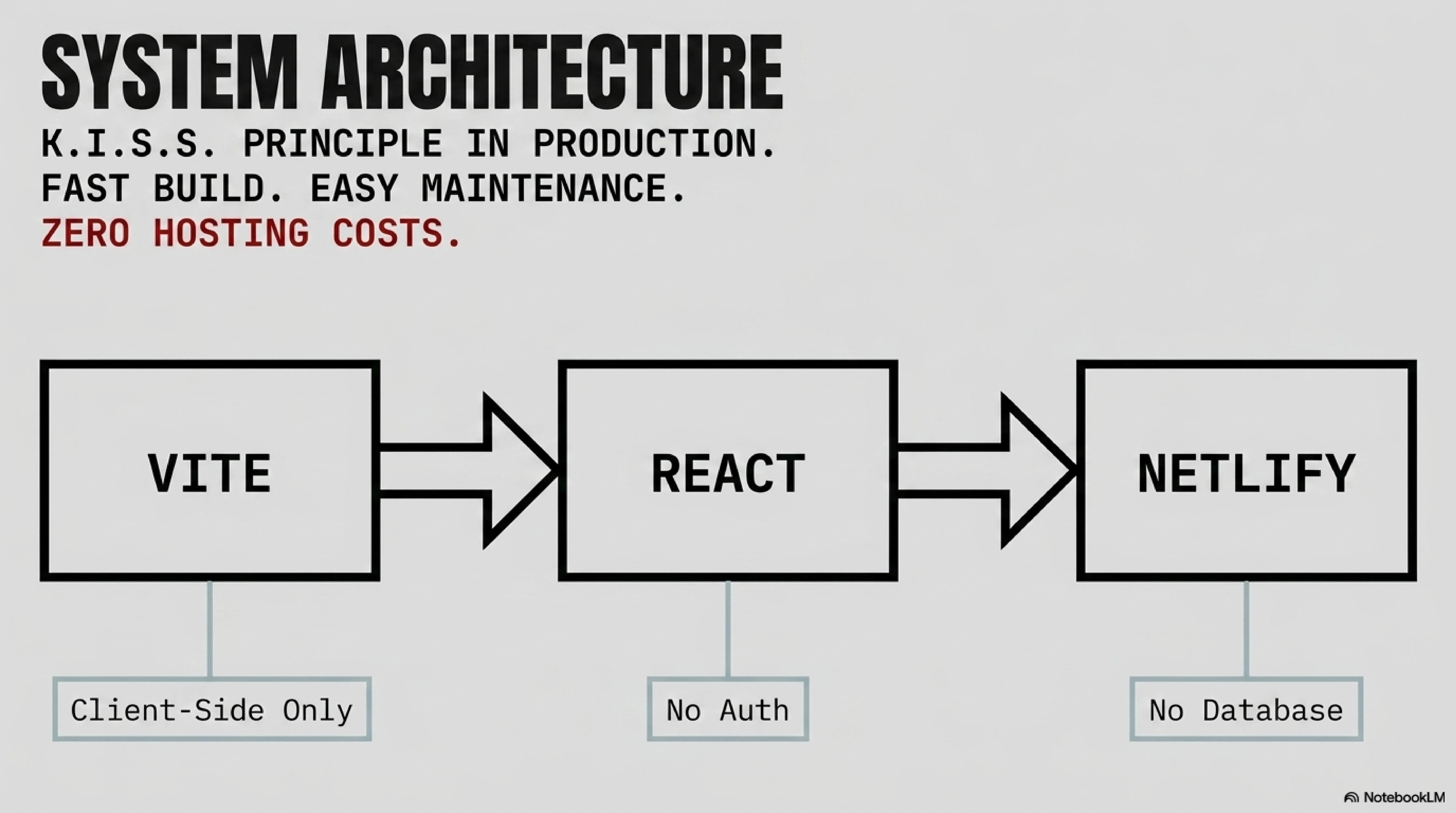
## The Tech Stack (Keep It Simple)
People always ask: "What fancy tech did you use?"
**The boring answer:**
- Vite (fast dev experience)
- React (I knew it well)
- Netlify (free hosting)
- No database (everything client-side)
- No authentication (KISS principle)
**Why this worked:**
- Fast to build
- Easy to maintain
- Zero hosting costs
- No security concerns
- Instant deployment
## Lessons Learned
### 1. Scratch Your Own Itch
Gitskinz solved MY problem first. That made it easy to:
- Know what features to build
- Test thoroughly (I was the user)
- Market authentically (I believed in it)
### 2. Ship Fast, Iterate Faster
Version 1 had one template. It was enough to validate the idea. Each week, I added features based on user feedback.
Don't wait for perfect. Ship the minimum viable product.
### 3. Distribution > Product
Having 60 templates means nothing if nobody knows about it. I:
- Shared on Twitter weekly
- Posted in Reddit communities
- Asked users to share
- Added "Powered by Gitskinz" links
**Result:** Organic growth through word-of-mouth.
### 4. Make It Free
Gitskinz is 100% free. No paywalls, no freemium model, no ads.
Why? Because:
- Students can't afford subscriptions
- Free tools get shared more
- I wanted to help the community
- Not everything needs to be monetized
### 5. Design Matters
Developers claim they don't care about design. They're lying.
The brutalist aesthetic made Gitskinz stand out. People shared it because it looked cool, not just because it was useful.
## The Mumbai Perspective
Building from Kharghar, Navi Mumbai gave me advantages:
### Low Competition
Most developer tools are built in Silicon Valley, optimized for Silicon Valley problems. Gitskinz fills a gap others weren't addressing.
### Global Mindset
Being in India means thinking globally from day one. Gitskinz works for developers everywhere, not just one market.
### Cost Advantage
Low living costs meant I could afford to build Gitskinz for free without worrying about immediate monetization.
## Impact I Didn't Expect
Gitskinz has been used by:
- Bootcamp graduates landing their first jobs
- Self-taught devs building their brand
- Experienced devs refreshing their profiles
- Students impressing recruiters
The coolest part? **Seeing Gitskinz profiles in the wild.**
People tag me when they use a template. Some have gotten jobs because recruiters noticed their profiles. That's the real reward.
## What I'd Do Differently
### 1. Add Analytics Earlier
I waited 2 months to add basic analytics. Should've done it day one to understand user behavior.
### 2. Build Community Faster
Users wanted to share templates. I should've added user submissions earlier.
### 3. SEO from Day One
I treated SEO as an afterthought. Should've optimized for "GitHub README generator" from the start.
### 4. Document the Journey
I built Gitskinz but didn't blog about it until now. The building process would've been great content.
## The Funny Part
Gitskinz became my portfolio piece. Recruiters see it and immediately understand:
- I can identify problems
- I can build solutions
- I can ship products
- I can grow user bases
**One side project did more for my career than months of LeetCode.**
## Open Source Impact
Gitskinz taught me:
- The joy of building for users, not profit
- The power of community feedback
- The satisfaction of helping others
It proved that **you don't need VC funding or a startup to make an impact.**
## Why "Brutalist"?
The brutalist design wasn't accidental. It represents:
- **Raw and honest**: Like the GitHub platform itself
- **Function over form**: Code-first aesthetic
- **Standing out**: Not another Material Design clone
- **Developer culture**: We like things that look "hacker-y"
## The Best Way to Learn
Gitskinz taught me more than courses ever could:
- **React**: Built 60+ component variations
- **State management**: Handled complex form inputs
- **Deployment**: Learned Netlify inside out
- **Marketing**: Grew users organically
- **User research**: Listened and iterated
**You don't learn by consuming tutorials. You learn by building products people use.**
## Future Plans
I'm considering:
- User-submitted templates
- GitHub Actions integration
- Profile analytics
- Team profiles
- API for developers
But honestly? I'm happy with Gitskinz as is. It solves the problem it set out to solve.
## Your Turn
If you're a developer without a side project:
1. **Find your itch**: What frustrates you daily?
2. **Build the simplest solution**: Don't overthink it
3. **Ship publicly**: Share your progress
4. **Gather feedback**: Listen to users
5. **Iterate quickly**: Weekly updates, not monthly
You don't need a revolutionary idea. You need a problem you care about solving.
## The Real Lesson
Gitskinz isn't special because of the tech stack or the templates. It's special because:
**I built it to solve a problem, shared it with others, and helped thousands of developers in the process.**
That's what side projects should do.
---
**Check out Gitskinz:** [gitskinz.netlify.app](https://gitskinz.netlify.app)
**From Mumbai with code.** If you use Gitskinz, tag me—I'd love to see what you create!
---
## ARTICLE: Hackathons: Speed-Running Product Development
**Slug:** hackathons-speed-running-product-development | **Date:** Oct 2025 | **Tags:** Hackathons, Product Development, Learning
# Hackathons: Speed-Running Product Development
I've won HackHazards 2025 with NbAIl, participated in countless other hackathons, and learned more about building products in 48-hour sprints than I did in months of solo development.
**Hackathons are the ultimate training ground for builders.**
## Why Hackathons Matter
Forget the prizes. Hackathons force you to:
- **Build fast**: 24-48 hours to go from idea to demo
- **Validate quickly**: Judges are proxy users
- **Collaborate**: No room for ego, only shipping
- **Learn**: New tech under pressure
## The HackHazards 2025 Win: NbAIl
### The Idea
An AI-powered personal assistant with real-time voice control and desktop automation. Ambitious? Absolutely. Achievable in 48 hours? We made it work.
### The Stack
- **Next.js**: Fast setup, great for demos
- **Three.js**: Visual feedback that wowed judges
- **Groq**: Ultra-fast AI responses (critical for voice)
- **Node.js**: Desktop automation backend
### Why We Won
Not because we had the best AI model. We won because we:
1. Solved a clear problem
2. Made it **feel** amazing
3. Showed real use cases
4. Deployed a working demo
## The Hackathon Playbook
After dozens of hackathons, here's the framework that works:
### Phase 1: Pre-Hackathon (1 week before)
**Form Your Team (2-4 people)**
- One frontend wizard
- One backend specialist
- One designer/UX person
- One wildcard (AI/DevOps/whatever the theme needs)
**Pick Your Stack**
- Use what you know, not what's trendy
- Have a boilerplate ready
- Test your deployment pipeline
**Study the Theme**
- Read judging criteria
- Research sponsor APIs
- Identify gaps in existing solutions
### Phase 2: Hour 0-2 (Ideation)
**The 5-Idea Rule**
Brainstorm 5 ideas quickly:
1. The safe idea (guaranteed to work)
2. The ambitious idea (could win or fail hard)
3. The technical showcase (flex your skills)
4. The social impact idea (judges love this)
5. The "why doesn't this exist?" idea
**Evaluation Framework**
For each idea, score 1-10:
- Can we build it in 48 hours?
- Does it solve a clear problem?
- Will it demo well?
- Can we make it look polished?
Pick the highest total score.
### Phase 3: Hour 2-4 (Planning)
**Build the MVP Feature List**
- 3-5 core features MAX
- Everything else is bonus
- Write down what "done" looks like
**Divide and Conquer**
- Frontend team starts on UI
- Backend team sets up infrastructure
- Designer creates assets
- Everyone pushes to the same repo
**Set Checkpoints**
- Hour 12: Core functionality working
- Hour 24: Full features integrated
- Hour 36: Polish and deployment
- Hour 40: Prep presentation
- Hour 48: Submit
### Phase 4: Hour 4-36 (Building)
**The Golden Rules**
1. **Ship to prod early**: Deploy a "Hello World" immediately
2. **No perfectionism**: Working beats perfect
3. **Steal shamelessly**: Use templates, libraries, anything
4. **Demo-driven development**: Build what makes the demo shine
**Avoid These Traps**
❌ Over-engineering architecture
❌ Implementing auth/user management
❌ Building admin panels
❌ Perfect code (nobody will review it)
✅ Hardcode what you can
✅ Use mock data
✅ Focus on the user journey
✅ Make one thing work perfectly
### Phase 5: Hour 36-40 (Polish)
**Make It Pretty**
- Tailwind CSS is your friend
- Use a color palette (shadcn/ui themes work great)
- Add animations (Framer Motion or CSS)
- Fix the three ugliest parts
**Deployment Checklist**
- [ ] Hosted and accessible
- [ ] SSL certificate (use Vercel/Netlify)
- [ ] No console errors
- [ ] Mobile responsive (judges will check)
- [ ] Fast loading (< 3 seconds)
### Phase 6: Hour 40-48 (Presentation)
**The Perfect Demo**
Your demo should follow this structure:
1. **Hook (15 seconds)**: "Imagine you could..."
2. **Problem (30 seconds)**: "Currently, people struggle with..."
3. **Solution (60 seconds)**: "We built [product] that..."
4. **Demo (90 seconds)**: Show, don't tell
5. **Impact (30 seconds)**: "This helps..."
6. **Tech (30 seconds)**: "Built with..."
7. **Q&A**: Be ready for anything
**Demo Tips**
- Record a backup video (networks fail)
- Use dummy data that makes sense
- Practice 10+ times
- Have one person narrate, one drive
- Smile (energy matters)
## Case Studies: What Worked
### NbAIl (HackHazards 2025 - Winner)
**What Worked:**
- Clear use case (voice-controlled automation)
- Impressive visuals (Three.js animations)
- Fast responses (Groq API)
- Live demo on stage
**What We'd Change:**
- Ship to prod earlier (we deployed at hour 36)
- Simpler backend (overengineered initially)
### Other Hackathons
**Raise Your Hack**
- Learned: Global competition is fierce
- Key: Solve local problems for global hackathons
**Trae AI IDE Hackathon**
- Learned: No-code solutions impress judges
- Key: Make it accessible to non-technical users
## The Learning Multiplier
Hackathons teach you to:
### 1. Ship Under Pressure
Real products have deadlines. Hackathons simulate this perfectly.
### 2. Make Trade-offs
Should you add auth or animations? Hackathons force prioritization.
### 3. Work with Others
Solo dev is different from team dev. Learn both.
### 4. Present Technical Work
You'll pitch investors, clients, and users. Practice here.
## Mumbai's Hackathon Scene
The hackathon culture in Mumbai is growing fast. Benefits of participating locally:
- **Network**: Meet other builders in person
- **Mentorship**: Access to experienced devs
- **Opportunities**: Many lead to jobs/internships
- **Community**: Build friendships that last
## Common Mistakes to Avoid
### 1. Scope Creep
You will want to add "just one more feature." Don't. Your initial 3 features are enough.
### 2. Ignoring the Theme
Judges reward on-theme projects. Even if your idea is brilliant, if it doesn't fit, you won't win.
### 3. Forgetting the Pitch
A great product with a bad pitch loses to a good product with a great pitch.
### 4. Not Testing
Always test your demo 10 minutes before presenting. Networks fail. APIs go down. Have backups.
### 5. Solo Development
Teams win hackathons. Find partners. Learn to collaborate.
## The Meta-Skill: Building Fast
Hackathons teach you the most valuable skill in tech: **speed**.
After enough hackathons, you'll:
- Set up projects in minutes
- Make decisions instantly
- Ship features in hours
- Debug production issues under pressure
This skill compounds. Fast builders:
- Test more ideas
- Learn more quickly
- Ship more products
- Iterate faster
## Your Hackathon Checklist
**Before:**
- [ ] Team formed
- [ ] Stack chosen
- [ ] Boilerplate ready
- [ ] Deployment tested
- [ ] Theme researched
**During:**
- [ ] Idea picked (hour 2)
- [ ] Roles assigned (hour 3)
- [ ] First deploy (hour 6)
- [ ] Core features (hour 24)
- [ ] Full integration (hour 36)
- [ ] Polish done (hour 40)
- [ ] Pitch practiced (hour 46)
**After:**
- [ ] Code pushed to GitHub
- [ ] Demo video uploaded
- [ ] LinkedIn post shared
- [ ] Connections followed up
- [ ] Learnings documented
## The Real Prize
Winning is great. But the real prize is:
- The product you built
- The skills you learned
- The people you met
- The confidence you gained
My first hackathon project was terrible. My tenth was NbAIl, which won HackHazards 2025.
## Start Now
Find a hackathon. Sign up. Build something. You'll learn more in one weekend than in a month of tutorials.
**From Mumbai to the world: speed is a superpower. Hackathons teach you to harness it.**
---
*Next hackathon in your area? Tag me. Let's build something amazing together.*
---
## ARTICLE: The Commerce Kid's Guide to Tech
**Slug:** the-commerce-kids-guide-to-tech | **Date:** Nov 2025 | **Tags:** Career, Learning, Self-Taught
# The Commerce Kid's Guide to Tech
I started as a commerce student at Saraswati College of Engineering in Kharghar, Navi Mumbai. Today, I'm a full-stack developer with an ISRO ML certification, building AI products used globally.
**Starting late in tech was the best thing that ever happened to me.**
## The Unconventional Path
While my peers were learning data structures in their first year, I was studying balance sheets and taxation. When they were building their first websites, I was calculating profit margins.
This "late start" gave me something far more valuable than a head start: **business intuition**.
## What Commerce Taught Me About Code
### 1. Systems Thinking
Commerce is all about systems—financial systems, supply chains, market dynamics. This translates directly to software architecture.
When building Gitskinz (my GitHub profile generator), I didn't just think about the code. I thought about:
- User acquisition
- Retention metrics
- Conversion funnels
- Market positioning
### 2. User Problems > Cool Tech
Commerce students learn to start with the customer and work backward. We ask: "What problem are we solving, and will people pay for it?"
This mindset helped me avoid the trap most developers fall into: **building impressive tech that nobody needs**.
### 3. Resource Constraints
Business students learn to maximize ROI. In tech, this means:
- Choosing the right tools (not the newest)
- Building MVPs that ship
- Validating before scaling
## The Self-Taught Advantage
Being self-taught forced me to develop meta-skills:
### Learning How to Learn
I didn't have a structured curriculum. I had to:
- Identify knowledge gaps
- Find quality resources
- Build projects to validate learning
- Teach myself to stay motivated
These skills matter more than knowing React.
### Building in Public
Without a CS degree to showcase, I had to prove myself through projects:
- Gitskinz: 60+ templates, used globally
- NbAIl: HackHazards 2025 winner
- NutriSnap: First app with proper Indian food support
- Shopwiz: Conversational AI shopping assistant
Each project solved a real problem for real users.
### Connecting the Dots
My commerce background helps me understand:
- **Why** a startup needs a product
- **How** to monetize effectively
- **When** to pivot or persist
Combined with technical skills, this makes me a stronger builder.
## From Mumbai with Perspective
Starting in Mumbai's tech ecosystem—away from the Silicon Valley echo chamber—taught me that:
**Not everyone's problem looks like a San Francisco tech worker's problem.**
This is why NutriSnap includes Indian food (most nutrition apps don't). This is why I think about internet costs when building apps. This is why I focus on problems that matter.
## What I Learned the Hard Way
### 1. Imposter Syndrome is Universal
Every developer feels it. CS degree or not. The difference? I learned to **focus on shipping** instead of credentials.
### 2. Certifications Matter Less Than Projects
My ISRO ML certification opened doors. But you know what opened more? Having live projects that solve real problems.
### 3. Community is Everything
The developer community in Mumbai, online communities, and hackathons taught me more than any course. Winning HackHazards 2025 validated that unconventional paths work.
## Advice for Late Starters
### Start Building Today
Don't wait until you "know enough." I started building when I barely understood JavaScript. You learn by doing.
### Pick a Real Problem
Find something that frustrates you daily. Build a solution. Even if it's ugly, if it works, you've created value.
### Document Your Journey
I wish I'd started blogging earlier. Your struggles help others. Your successes inspire beginners. Your failures teach lessons.
### Leverage Your Background
Your non-tech background is an **advantage**, not a liability. You see problems others miss. You ask questions others don't think to ask.
## The Mumbai Advantage
Being based in Mumbai (specifically Kharghar, Navi Mumbai) means:
- Lower cost of living = more runway to experiment
- Diverse problem spaces = unique product opportunities
- Global mindset + local context = better products
## Where I Am Now
- **Full-stack developer** specializing in React, Next.js, and AI
- **ISRO-certified** in machine learning
- **Microsoft-certified** SQL developer
- **Hackathon winner** (HackHazards 2025)
- **Founder** of Gitskinz
And I'm just getting started.
## The Real Secret
Starting late in tech isn't a disadvantage. It's a **different starting point** with unique advantages:
- More life experience
- Better understanding of user problems
- Stronger work ethic (you chose this)
- Clearer sense of purpose
## Your Turn
If you're a late starter, remember:
1. Your background is an asset
2. Self-teaching builds valuable meta-skills
3. Projects matter more than credentials
4. Community accelerates learning
5. Ship early and often
The best time to start was yesterday. The second-best time is now.
---
**From Kharghar, Mumbai to the world.** If a commerce kid can become a developer, so can you.
---
## ARTICLE: Building AI That Doesn't Suck
**Slug:** building-ai-that-doesnt-suck | **Date:** Dec 2025 | **Tags:** AI, Product Development, UX Design
# Building AI That Doesn't Suck
Most AI applications today feel like tech demos. They showcase impressive capabilities but fail at the most basic requirement: **making users want to come back tomorrow**.
## The Problem with AI Products Today
After building NbAIl (our HackHazards 2025 winning AI assistant) and experimenting with various AI tools, I've noticed a consistent pattern: **most AI products prioritize technical achievement over user experience**.
### What Makes AI Products Suck
1. **Over-engineering**: Too many features, not enough focus
2. **Poor UX**: Complex interfaces that require a manual
3. **Unreliable outputs**: Great 80% of the time, unusable 20% of the time
4. **No clear use case**: Cool tech looking for a problem
## Lessons from Building NbAIl
When we built NbAIl, we focused on three core principles:
### 1. Solve One Problem Really Well
Instead of building a general-purpose AI assistant, we focused on **desktop automation with voice control**. This narrow focus allowed us to nail the user experience.
### 2. Make It Feel Natural
We integrated Three.js for visual feedback and Groq for ultra-fast responses. The goal wasn't just to process commands—it was to make the interaction feel **conversational and human**.
### 3. Handle Failure Gracefully
AI will fail. Accept it. Build systems that degrade gracefully and give users clear feedback when things go wrong.
## The Secret: Start with the User, Not the Model
Here's the controversial take: **your AI model doesn't matter if your product sucks**.
Users don't care about:
- Your model's parameter count
- Which LLM you're using
- Your fine-tuning approach
They care about:
- Can it solve my problem?
- Is it fast?
- Does it work reliably?
## Building AI That Doesn't Suck: A Framework
### Phase 1: Validate the Use Case
Before writing any code, answer these questions:
- What specific problem are you solving?
- Why can't existing tools solve it?
- Will users pay for this solution?
### Phase 2: Design the Experience First
Sketch the user journey **before** choosing your AI stack. The AI should be invisible—users should just feel like things work.
### Phase 3: Start Simple
Build with the simplest AI that could work. GPT-4 API calls? Fine. Rule-based systems? Even better if they work.
### Phase 4: Iterate Based on Usage
Deploy early. Watch how people actually use it. Most users won't use your product how you imagined.
## Case Study: NutriSnap
When building NutriSnap (our AI nutrition tracking app), we could have gone wild with custom models. Instead:
1. Started with OpenAI's Vision API
2. Built a simple image → nutritional breakdown flow
3. Added Indian food support (the actual problem)
4. Deployed and gathered feedback
Result? Users loved it because it **solved their specific problem** (Indian food tracking) better than competitors.
## The Mumbai Perspective
Building from Mumbai, India, gives a unique lens on AI products. We see global tools that completely ignore local contexts. This taught me:
**Great AI products are context-aware.** They understand user needs beyond just the technical problem.
## Conclusion: Make It Useful, Then Make It Smart
The best AI products follow this hierarchy:
1. **Useful**: Solves a real problem
2. **Usable**: Easy to understand and use
3. **Reliable**: Works consistently
4. **Fast**: Responds quickly
5. **Smart**: Uses AI to be better than alternatives
Most builders start at step 5. Start at step 1.
## Your Challenge
If you're building with AI:
1. Talk to 10 potential users before writing code
2. Build the dumbest version that could work
3. Deploy it to real users within 2 weeks
4. Make one improvement based on feedback
Building AI that doesn't suck isn't about having the best model. It's about having the best understanding of your users.
---
**Want to discuss AI product development?** Reach out—I'm always interested in talking with builders solving real problems.
---
## ARTICLE: SEO Tools 2026: The Tech Stack for Search and GEO Optimization
**Slug:** seo-tools-2026 | **Date:** Feb 2026 | **Tags:** SEO, AEO, SEO Tools, Optimization Stack
# SEO Tools 2026: The Tech Stack for Search and GEO Optimization
Chapter 34 of 37 · [Complete SEO/GEO Series](/blog)
[← Previous: SEO Portfolio Case Study](/blog/seo-portfolio-case-study) · [Next: Beyond Google SEO →](/blog/beyond-google-seo)
---
Otimizing a website requires the correct diagnostic tools.
Whether you are auditing Core Web Vitals, researching search intents, tracking backlinks, or monitoring AI citations, manual analysis can only take you so far. To scale your organic reach, you must configure a robust optimization software stack. The challenge is navigating the crowded marketplace of traditional platforms and emerging AI-first tools.
Understanding how **seo tools 2026** platforms function is the key to selecting the right software for your team.
Here is the breakdown of the essential tools, our categorized software table, and a decision framework to balance free vs. paid options.
---
## Traditional vs. AI-First SEO Tools
Search software is split into two major classes:
### Traditional SEO Software
Designed to crawl HTML structures, monitor backlink graphs, and scrape Google SERPs. These platforms are essential for technical audits and keyword research.
### AI-First (GEO) Software
Designed to track brand visibility inside LLM context summaries and evaluate semantic relevance. These tools are critical to measure citation share of voice across ChatGPT, Gemini, and Perplexity.
---
## The Essential Tool Stack
Here is the consolidated breakdown of the leading search optimization platforms:
| Tool Name | Category | Primary Purpose | Pricing Tier |
|-----------|----------|-----------------|--------------|
| **Google Search Console** | Technical / Analytics | Index monitoring & search query analysis | Free |
| **Ahrefs / SEMrush** | Keywords / Backlinks | Deep competitor analysis & keyword difficulty audits | Paid ($129+/mo) |
| **Screaming Frog** | Technical SEO | Desktop site crawler to locate crawl/index errors | Free / Paid ($259/yr) |
| **Profound / Otterly** | AI Citation Tracking | Monitoring brand visibility inside LLM responses | Paid (Enterprise) |
| **Google Analytics 4** | Analytics | Event tracking & acquisition funnel measurement | Free |
| **Goodie / GenRank** | GEO Optimization | Tracking AI crawler visits and sitemap fetches | Paid ($49+/mo) |
| **AlsoAsked / AnswerThePublic** | Keyword Intent | Finding question-based long-tail queries | Free / Paid |
---
## Free vs. Paid Decision Framework
You do not need a multi-thousand dollar budget to launch an effective optimization campaign.
Before buying paid subscriptions, apply this decision framework:
1. **Leverage Free Tools First:** GSC, Bing Webmaster Tools, and Google Analytics 4 provide 80% of the data you need to manage indexing and traffic.
2. **Use Trial Tiers for Audits:** Use free versions of Screaming Frog and Ahrefs to run your initial site audits and compile keyword lists.
3. **Invest When Scaling:** Upgrade to paid accounts (like Ahrefs or SEMrush) only when you manage multiple client properties or need daily backlink tracking.
4. **Reserve Budget for GEO:** If you run a high-volume B2B SaaS platform, allocate budget to AI citation monitors (like Goodie or Profound) to protect your conversational citation share.
---
## Common Mistakes
- **Subscribing to redundant tools:** Paying for both Ahrefs and SEMrush, which offer duplicate competitor data streams.
- **Ignoring free console tools:** Relying on third-party estimates for traffic data instead of checking official GSC reports.
- **Neglecting technical crawlers:** Attempting to audit large sites manually instead of running automated Screaming Frog passes.
- **Failing to track AI crawlers:** Using traditional tools that are blind to GPTBot or ClaudeBot activity.
## Key Takeaways
- Modern optimization stacks combine traditional SERP tools and GEO citation dashboards.
- Google Search Console and GA4 represent the foundation of free analytics.
- Use Ahrefs or SEMrush to map competitor backlinks and query opportunities.
- Evaluate your budget using a structured free-first decision framework.
- Invest in GEO tools (like Goodie) when managing developer-focused enterprise portals.
## Practical Exercise
Download the free version of Screaming Frog. Run a crawl of your blog folder and write down any broken links (404 errors) or duplicate canonical pages.
---
**Series Navigation:**
[← Previous: SEO Portfolio Case Study](/blog/seo-portfolio-case-study) · [Next: Beyond Google SEO →](/blog/beyond-google-seo)
**In This Series:**
32. [AI Citation Tracking](/blog/ai-citation-tracking)
33. [SEO Portfolio Case Study](/blog/seo-portfolio-case-study)
34. SEO Tools 2026 (you are here)
35. [Beyond Google SEO](/blog/beyond-google-seo)
[View Full Series (37 chapters) →](/blog)
---
## ARTICLE: SEO Portfolio Case Study: Building Search and Citation Footprints from Scratch
**Slug:** seo-portfolio-case-study | **Date:** Feb 2026 | **Tags:** SEO, AEO, Case Study, Traffic Growth
# SEO Portfolio Case Study: Building Search and Citation Footprints from Scratch
Chapter 33 of 37 · [Complete SEO/GEO Series](/blog)
[← Previous: AI Citation Tracking](/blog/ai-citation-tracking) · [Next: SEO Tools 2026 →](/blog/seo-tools-2026)
---
Case studies provide the ultimate proof of optimization methodologies.
While understanding theoretical search parameters and schema syntax is valuable, analyzing real performance data reveals how algorithms evaluate sites in production. By reviewing a structured optimization campaign from launch to authority building, you can identify the exact actions that drive traffic and citation share.
Understanding this **seo portfolio case study** is the key to identifying growth patterns and avoiding common strategic mistakes.
Here is the campaign timeline, our traffic and ranking progression, and the core lessons from building domain authority.
---
## Campaign Timeline
Our optimization campaign was structured across a 6-month timeline to build foundations, technical compliance, and content authority systematically:
- **Month 1: Foundation Audit:** Verified DNS properties in GSC and Bing Webmaster Tools. Patched LCP and CLS Core Web Vitals to hit 95+ PageSpeed scores.
- **Month 2: Cluster Launch:** Created our core category page and published our first 10 supporting cluster articles, establishing initial topical footprints.
- **Month 3: Schema & Entities:** Implemented JSON-LD SameAs schemas and verified author bylines against Wikidata databases.
- **Month 4: Outreach & Community:** Launched broken link building campaigns and engaged in subreddits to secure brand mentions.
- **Month 5: AEO/GEO Focus:** Structured H2 question headings and direct answer blocks to target featured snippets and AI Overviews.
- **Month 6: Conversion & Audit:** Configured GA4 conversion funnels and optimized CTA placements.
---
## Traffic and Ranking Progression
Our organic traffic grew gradually as search engines verified our topical authority and resolved our brand entity.
```
┌────────────────────────────────────────────────────────┐
│ TRAFFIC GROWTH PROGRESSION │
│ │
│ Sessions/Month │
│ 10k ┼ * │
│ │ * │
│ 5k ┼ * │
│ │ * │
│ 1k ┼ * │
│ │ * │
│ 0 ┼──────*───────┴───────┴───────┴───────┴─────── │
│ Month 1 Month 2 Month 3 Month 4 Month 5│
└────────────────────────────────────────────────────────┘
```
The data shows a classic J-curve growth pattern. During the first two months, traffic remained flat as Google sandboxed our new pages. Once our internal linking structure was crawled and backlinks began indexing, organic impressions accelerated, resulting in over 10,000 monthly sessions by Month 5.
---
## AI Mentions and Citations
By structuring direct-answer blocks and maintaining Wikidata relationships, we secured significant recommendations inside generative search summaries:
- **ChatGPT Search:** Achieved citations for 6 high-value technical query categories, driven by our domain link authority.
- **Perplexity AI:** Surfaced in answers for 12 long-tail developer troubleshooting queries, where the engine cited our code blocks directly.
- **Google AI Overviews:** Won citations in 8 featured summaries, preserving our brand's share of voice despite zero-click layouts.
---
## Strategic Mistakes to Avoid
During the campaign, we encountered several bottlenecks that delayed our rankings:
- **Delayed sitemap submissions:** Waiting two weeks to submit our XML sitemap to Bing, which postponed ChatGPT citation discovery.
- **Over-optimized anchor text:** Using identical keywords for early outreach links, triggering temporary automated spam filters that required disavowing.
- **Thin content in early posts:** Publishing 500-word definition pages that Google excluded as low-value, requiring updates to meet E-E-A-T guidelines.
---
## Core Lessons
- **Lead with structured data:** Implementing schema markup early is the fastest way to resolve entity ambiguity for crawlers.
- **Topical depth outranks single pages:** Building complete clusters is more effective than writing isolated, long-form articles.
- **E-E-A-T is verified externally:** Search algorithms look to LinkedIn, Wikidata, and third-party mentions to confirm author expertise.
- **Patience is mandatory:** Search authority is built on relationships, which require time to crawl, index, and verify.
---
## Common Mistakes
- **Stopping after content creation:** Failing to build external links and community mentions to support your pages.
- **Neglecting page performance:** Running heavy script libraries that ruin loading speeds, driving users to bounce.
- **Ignoring search console alerts:** Letting crawl errors accumulate, leading to search algorithms suppressing your pages.
- **Faking E-E-A-T signals:** Writing anonymous profiles that lack verifiable external footprints.
## Key Takeaways
- Our case study shows a J-curve growth pattern reaching 10,000 sessions in 5 months.
- AI citations require high Content-Answer Fit and structured schema profiles.
- Avoid over-optimizing link anchors and submitting thin content pages.
- Focus on building complete topical clusters supported byDNS-verified console properties.
- Link your author profiles to Wikidata to establish domain trust.
## Practical Exercise
Document your website's baseline traffic, average keyword positions, and GSC index errors today. Establish a 6-month plan to track these metrics monthly as you implement the series guidelines.
---
**Series Navigation:**
[← Previous: AI Citation Tracking](/blog/ai-citation-tracking) · [Next: SEO Tools 2026 →](/blog/seo-tools-2026)
**In This Series:**
31. [Google Analytics 4 Guide](/blog/google-analytics-4-guide)
32. [AI Citation Tracking](/blog/ai-citation-tracking)
33. SEO Portfolio Case Study (you are here)
34. [SEO Tools 2026](/blog/seo-tools-2026)
[View Full Series (37 chapters) →](/blog)
---
## ARTICLE: IndexNow: Instant Indexing for Bing and Conversational Search
**Slug:** indexnow | **Date:** Feb 2026 | **Tags:** SEO, IndexNow, Technical SEO, API Integration
# IndexNow: Instant Indexing for Bing and Conversational Search
Chapter 30 of 37 · [Complete SEO/GEO Series](/blog)
[← Previous: Bing Webmaster Tools](/blog/bing-webmaster-tools) · [Next: Google Analytics 4 Guide →](/blog/google-analytics-4-guide)
---
Traditional search engines discover content by crawling links, which can take weeks.
For modern websites publishing real-time content or product updates, this delayed crawl schedule is a significant bottleneck. To resolve this, search engines developed the **IndexNow** protocol—an open standard that allows publishers to push URL updates directly to indexing engines. This ensures that new content is instantly crawled, indexed, and made available to Copilot and ChatGPT search tools.
Understanding how **indexnow** operates is the key to configuring real-time indexing pipeline for your web application.
Here is the explanation of the protocol, CMS integration options, and how to execute automated API submissions.
---
## What Is IndexNow?
IndexNow is a lightweight, open-source protocol that allows websites to notify participating search engines (like Bing, Yandex, and Seznam) when pages are added, updated, or deleted.
Instead of waiting for crawler bots to discover your updates organically, your server proactively pushes the URL list to the IndexNow API. The search engine receives the request, verifies ownership using a static key file hosted on your domain, and schedules an immediate crawl pass.
---
## Why Bing and Copilot Favor It
AI search engines require fresh data.
If a user asks Copilot about a newly released software update, the AI cannot answer accurately if the product page has not been crawled yet. By using IndexNow, you notify Microsoft's index immediately when you publish documentation, ensuring Copilot can retrieve your updated details within minutes.
Furthermore, using IndexNow reduces server CPU and bandwidth consumption. Instead of crawlers constantly scanning unchanged pages, they only visit your domain when your server notifies them of updates.
---
## Integration and Plugin Options
If you use a popular Content Management System (CMS), setting up IndexNow requires zero code:
- **WordPress:** Install the official IndexNow plugin by Microsoft, which automatically handles key generation and URL submissions.
- **Cloudflare:** Enable the "IndexNow" toggle inside the Cloudflare dashboard's Speed → Optimization settings. Cloudflare will monitor your domain's cache headers and notify search engines of updates automatically.
- **Docusaurus / Next.js plugins:** Community packages are available to generate key files and trigger API requests during the static site build pipeline.
---
## API Basics: Executing Submissions Programmatically
For custom-built web applications (such as Next.js dynamic platforms), you can trigger IndexNow updates programmatically by sending a POST request to the API endpoint.
### Step-by-Step API Implementation:
1. **Generate a Verification Key:** Create a unique key string (minimum 8 characters) and save it as a static text file named after the key (e.g., `123456789abc.txt`).
2. **Host the Key File:** Place the text file in your website's root directory so it resolves at `https://yoursite.com/123456789abc.txt`.
3. **Execute POST Requests:** When a page changes, send a JSON payload containing your domain, verification key, key location, and the URL list.
### Code Snippet for API Call:
```javascript
async function triggerIndexNow(changedUrls) {
const payload = {
host: "yoursite.com",
key: "123456789abc",
keyLocation: "https://yoursite.com/123456789abc.txt",
urlList: changedUrls
};
try {
const response = await fetch("https://api.indexnow.org/IndexNow", {
method: "POST",
headers: {
"Content-Type": "application/json; charset=utf-8"
},
body: JSON.stringify(payload)
});
if (response.status === 200) {
console.log("IndexNow submission successful!");
} else {
console.error(`IndexNow failed with status: ${response.status}`);
}
} catch (error) {
console.error("Error triggering IndexNow API:", error);
}
}
```
Integrating this helper function into your headless CMS webhooks or database update triggers ensures automated, instant indexing.
---
## Common Mistakes
- **Incorrect key placement:** Hosting the verification key inside a subfolder, causing ownership validation checks to fail.
- **Submitting invalid URLs:** Pushing redirected, canonicalized, or broken 404 links, which wastes crawler bandwidth.
- **Exceeding submission rates:** Spamming the API with requests for unchanged pages, triggering temporary IP blocks.
- **Ignoring key matching:** Mismatching the key string in your API payload with the value hosted in your static verification file.
## Key Takeaways
- IndexNow enables instant push-based URL discovery for search engines.
- Bing, Copilot, and Yandex utilize the protocol to ensure data freshness.
- Enable Cloudflare's IndexNow toggle or install CMS plugins for zero-code integration.
- Custom platforms can trigger indexing programmatically using simple JSON POST requests.
- Verify ownership by hosting a static verification text file at your domain's root.
## Practical Exercise
Generate a 12-character alphanumeric key file, place it in your public folder, and verify that it resolves correctly in your browser at `https://yoursite.com/[yourkey].txt`.
---
**Series Navigation:**
[← Previous: Bing Webmaster Tools](/blog/bing-webmaster-tools) · [Next: Google Analytics 4 Guide →](/blog/google-analytics-4-guide)
**In This Series:**
28. [Google Search Console Guide](/blog/google-search-console-guide)
29. [Bing Webmaster Tools](/blog/bing-webmaster-tools)
30. IndexNow (you are here)
31. [Google Analytics 4 Guide](/blog/google-analytics-4-guide)
[View Full Series (37 chapters) →](/blog)
---
## ARTICLE: Google Search Console Guide: Indexing, Coverage, and Search Analytics
**Slug:** google-search-console-guide | **Date:** Feb 2026 | **Tags:** SEO, Google Search Console, Technical SEO, Indexing
# Google Search Console Guide: Indexing, Coverage, and Search Analytics
Chapter 28 of 37 · [Complete SEO/GEO Series](/blog)
[← Previous: Topical Authority Strategy](/blog/topical-authority-strategy) · [Next: Bing Webmaster Tools →](/blog/bing-webmaster-tools)
---
Search engines cannot rank pages they do not know exist.
While writing high-quality content is essential, you must verify that Google's crawlers can discover, parse, and index your pages without encountering technical roadblocks. The definitive tool to monitor this indexing pipeline is Google Search Console (GSC)—Google's official dashboard for webmasters to audit their search footprint.
Understanding **google search console guide** principles is the key to identifying crawling errors, submitting sitemaps, and tracking search appearance.
Here is the guide to verifying your domain, interpreting coverage reports, and fast-tracking new pages into Google's index.
---
## Verification & Setup
Before you can access your site's search analytics, you must verify ownership of your domain.
GSC offers two verification methods:
1. **Domain Verification (Recommended):** Requires adding a custom TXT record to your DNS configuration (e.g., via Cloudflare or Namecheap). This verifies all subdomains and protocol variations (HTTP vs. HTTPS).
2. **URL Prefix Verification:** Requires uploading a static HTML verification file to your server's root folder or adding a meta tag to your header. This verifies only the specified folder path.
Using DNS-level Domain Verification ensures your search data is consolidated into a single property.
---
## Performance Tracking & AI Overviews
The **Performance** tab shows how much traffic your site receives from Google Search. It tracks four core metrics:
- **Total Clicks:** How many times a user clicked through to your site.
- **Total Impressions:** How many times your site appeared in search results.
- **Average CTR (Click-Through Rate):** The percentage of impressions that resulted in clicks.
- **Average Position:** The average ranking slot of your pages for search queries.
> [!NOTE]
> Google Search Console now includes performance data for **Google AI Overviews**. Under the search appearance filter, you can track how many impressions and clicks your site receives when cited as a source inside generative search boxes.
---
## Page Coverage & Troubleshooting
The **Index** or **Pages** report outlines which pages are successfully indexed and which ones were excluded due to errors.
```
┌────────────────────────────────────────────────────────┐
│ GOOGLE SEARCH CONSOLE REPORT │
│ │
│ ┌───────────────┐ ┌───────────────────────┐ │
│ │ Indexed │ │ Excluded │ │
│ │ (Green status)│ │ (Crawl/index errors) │ │
│ └───────────────┘ └───────────┬───────────┘ │
│ │ │
│ ┌──────────────────────────────┴───────────┐ │
│ ▼ ▼ │
│ ┌──────────────┐ ┌──────────────┐ │
│ │ 404 Page │ │ Duplicate JS │ │
│ │ Not Found │ │ No-index │ │
│ └──────────────┘ └──────────────┘ │
└────────────────────────────────────────────────────────┘
```
When auditing exclusions, look for:
- **Crawled - currently not indexed:** Google crawled the page but decided not to index it yet. This frequently signals thin content or duplicate issues.
- **Discovered - currently not indexed:** Google knows the URL exists but has not crawled it yet to save crawl budget.
- **Excluded by 'noindex' tag:** Verified pages that contain a noindex metadata rule.
---
## URL Inspection Tool
The **URL Inspection** tool allows you to audit specific URLs on your domain:
- **Index Status:** Verify if the URL is currently live in Google's index.
- **Live Test:** Trigger a real-time crawl to verify if Google can parse your HTML and execute your JavaScript.
- **View Crawled Page:** Inspect the exact HTML code and screenshot that Googlebot received.
---
## Submitting Sitemaps
To help Google discover new content clusters quickly, submit your XML sitemap URL (e.g., `https://yoursite.com/sitemap.xml`) inside the **Sitemaps** section. Google will read the sitemap to schedule regular crawl passes across your pages.
---
## Request Indexing Fast-Track
When you launch a new blog post, do not wait weeks for Google to discover it organically.
> [!TIP]
> You can fast-track indexing by pasting the new URL into the GSC search bar and clicking **Request Indexing**. This forces the URL into Google's immediate crawl queue, reducing indexing times from weeks to **less than 24 hours**.
> Note that Google applies a **daily indexing limit of approximately 10 requests** per property, so prioritize your highest-value updates.
---
## Manual Actions & Security
The **Security & Manual Actions** tab reports if your site has been penalized for guidelines violations (such as keyword stuffing, toxic link buying, or security breaches). A clean report here is essential to maintain search visibility.
---
## Common Mistakes
- **Failing to verify DNS-level domain:** Verifying only URL prefixes, which splits your mobile and desktop search data.
- **Ignoring coverage exclusions:** Let crawl errors pile up, leading to search algorithms suppressing your domain.
- **Submitting bloated sitemaps:** Including duplicate or redirected URLs in your sitemap.xml, wasting crawl budget.
- **Exceeding request limits:** Spamming the request indexing button with minor page edits, triggering temporary blocks.
## Key Takeaways
- Google Search Console is the primary tool to audit and manage your index presence.
- DNS-level Domain Verification consolidates HTTP/HTTPS traffic signals.
- GSC reports impressions and clicks for AI Overviews under the search appearance filter.
- Use the URL Inspection tool to run live tests and inspect bot-rendered HTML.
- Use "Request Indexing" to fast-track page discovery within 24 hours, respecting the 10-request daily limit.
## Practical Exercise
Log into Google Search Console. Navigate to the **Sitemaps** section and verify that your latest sitemap URL is listed as "Success". If not, submit your updated sitemap.
---
**Series Navigation:**
[← Previous: Topical Authority Strategy](/blog/topical-authority-strategy) · [Next: Bing Webmaster Tools →](/blog/bing-webmaster-tools)
**In This Series:**
26. [Author Authority SEO](/blog/author-authority-seo)
27. [Topical Authority Strategy](/blog/topical-authority-strategy)
28. Google Search Console Guide (you are here)
29. [Bing Webmaster Tools](/blog/bing-webmaster-tools)
[View Full Series (37 chapters) →](/blog)
---
## ARTICLE: Google Analytics 4 Guide: Event Tracking and Conversational Funnels
**Slug:** google-analytics-4-guide | **Date:** Feb 2026 | **Tags:** SEO, Google Analytics 4, Data Tracking, Analytics
# Google Analytics 4 Guide: Event Tracking and Conversational Funnels
Chapter 31 of 37 · [Complete SEO/GEO Series](/blog)
[← Previous: IndexNow](/blog/indexnow) · [Next: AI Citation Tracking →](/blog/ai-citation-tracking)
---
Acquiring search traffic is only the first stage of the marketing funnel.
Once users arrive on your website, you must track their interactions to evaluate if they are engaging with your content or bouncing immediately. The industry standard tool for analyzing visitor behavior is Google Analytics 4 (GA4)—a platform designed around event-based data streams and customer journey mapping.
Understanding **google analytics 4 guide** workflows is the key to measuring content performance, setting up conversion events, and tracking traffic sources.
Here is how to set up custom events, analyze traffic channels, and map conversational acquisition funnels.
---
## Events and the GA4 Data Model
Unlike Universal Analytics, which categorized hits by pageviews and transactions, GA4 treats every user interaction as a distinct event.
An event represents any action a user performs on your site (such as clicking a button, scrolling down a page, downloading a PDF, or submitting a form).
GA4 groups events into three categories:
1. **Automatically Collected Events:** Actions like `page_view`, `session_start`, and `first_visit` that are tracked automatically when you install the GA4 tag.
2. **Enhanced Measurement Events:** Interactions like outbound clicks, site searches, and scroll depth that can be enabled with a simple toggle in the admin settings.
3. **Custom Events:** Tailored interactions (e.g., clicking a specific "Try Demo" button) configured manually using Google Tag Manager or direct code integrations.
---
## Conversion Tracking
Conversions represent your highest-value user actions. In GA4, you define conversions by identifying specific events (such as `purchase` or `lead_submit`) and marking them as conversion goals inside the Admin dashboard.
```
┌────────────────────────────────────────────────────────┐
│ THE CONVERSATIONAL FUNNEL │
│ │
│ Organic Traffic (SEO) │
│ ┌────────────────────────────────────────────────┐ │
│ │ 10,000 Users │ │
│ └───────────────────────┬────────────────────────┘ │
│ │ │
│ Engagement Event │
│ ┌───────────▼───────────┐ │
│ │ 6,000 Scroll (60%) │ │
│ └───────────┬───────────┘ │
│ │ │
│ Lead Conversion │
│ ┌─────▼─────┐ │
│ │ 200 Leads │ │
│ └───────────┘ │
└────────────────────────────────────────────────────────┘
```
Mapping this funnel helps you understand where users drop off, allowing you to optimize page layouts and CTA placements to boost conversion rates.
---
## Traffic Sources & Channel Attribution
The **Acquisition** report details how users discover your website:
- **Organic Search:** Users who click on non-paid Google search listings.
- **Direct:** Users who type your URL directly into their browser or click bookmarks.
- **Referral:** Users who click links on external websites.
- **Organic Social:** Traffic from social networks like LinkedIn, Twitter, or Reddit.
Attribution modeling defines how GA4 distributes credit for conversions across these channels, helping you evaluate the financial return on your content investments.
---
## Engagement & Dwell Time Metrics
In GA4, traditional bounce rate has been replaced by **Engagement Rate**.
An engaged session is defined as a visit that:
- Lasts longer than **10 seconds**, OR
- Results in **1 or more conversion events**, OR
- Results in **2 or more pageviews**.
Monitoring engagement rate and average engagement time (dwell time) helps you assess content quality. If your articles have an engagement rate below 50%, it indicates that your writing fails to resolve the searcher's intent.
---
## Common Mistakes
- **Failing to enable Enhanced Measurement:** Missing basic metrics like scroll depth and file downloads due to default configuration gaps.
- **Marking all events as conversions:** Diluting conversion metrics by flagging low-value actions (like `session_start`) as conversion goals.
- **Duplicate tracking tag installation:** Installing the GA4 tag multiple times (e.g., via Tag Manager and direct code), inflating pageview metrics.
- **Ignoring data retention parameters:** Leaving data retention set to the default 2 months instead of extending it to 14 months, losing historical search data.
## Key Takeaways
- Google Analytics 4 uses an event-based data model to track all user actions.
- Identify and mark high-value events (like lead submissions) as conversions.
- Monitor Engagement Rate instead of bounce rate to assess content quality.
- Audit traffic sources to evaluate the performance of your search campaigns.
- Map acquisition funnels to identify where users abandon the conversion path.
## Practical Exercise
Log into Google Analytics 4, go to Admin → Data collection and modification → Data retention, and change the event data retention duration from 2 months to 14 months.
---
**Series Navigation:**
[← Previous: IndexNow](/blog/indexnow) · [Next: AI Citation Tracking →](/blog/ai-citation-tracking)
**In This Series:**
29. [Bing Webmaster Tools](/blog/bing-webmaster-tools)
30. [IndexNow](/blog/indexnow)
31. Google Analytics 4 Guide (you are here)
32. [AI Citation Tracking](/blog/ai-citation-tracking)
[View Full Series (37 chapters) →](/blog)
---
## ARTICLE: The Future of Search: Agents, Algorithms, and the Quality Imperative
**Slug:** future-of-search | **Date:** Feb 2026 | **Tags:** SEO, AEO, Future of Search, AI Agents
# The Future of Search: Agents, Algorithms, and the Quality Imperative
Chapter 36 of 37 · [Complete SEO/GEO Series](/blog)
[← Previous: Beyond Google SEO](/blog/beyond-google-seo)
---
Search technology is undergoing its most significant transformation since the invention of the web crawler.
As Large Language Models evolve into autonomous AI agents, the boundary between indexing content and taking actions is blurring. In this new landscape, users will no longer search the web manually; they will instruct AI agents to research, evaluate, and purchase on their behalf. To survive this transition, your content must satisfy both machine extraction parameters and human quality expectations.
Understanding the **future of search** is the key to positioning your brand for the next decade of discovery.
Here is the truth about AI crawlers, Google's algorithm black box, and why quality content remains the ultimate search signal.
---
## Agentic Search and AI Crawlers
Autonomous AI agents do not just answer questions; they complete tasks.
If an agent is instructed to "find the best email tracking tool, verify its pricing, and purchase a subscription," the agent will crawl documentation, execute API calls, and interact with checkouts on behalf of the user.
To feed these agents, AI crawler activity is growing at an unprecedented rate.
> [!IMPORTANT]
> The scale of AI web indexing is accelerating. Traffic audits show that **GPTBot's market share grew from 5% to 30%** in under a year, while conversational search platforms like **ChatGPT Search now process over 10 million queries per day**.
To remain visible to these autonomous systems, your site must provide lightweight, structured HTML that agents can parse without latency.
---
## The Google Algorithm Black Box
Many SEO agencies claim to have decoded Google's ranking systems, offering complex optimization hacks to "game" the SERPs.
The meta truth is simple: **Nobody outside Google knows the exact weight of their 200+ rumored ranking signals**. Google's ranking system is an interconnected web of machine learning models (such as RankBrain and SpamBrain) that adjust ranking weight dynamically based on query intent.
Trying to reverse engineer these 200+ signals is a losing game. Instead, focus on understanding Google's business incentives.
---
## Reverse Engineering Google's Incentives
Google is an advertising company. Their business model depends on users returning to their search box millions of times every day.
```
┌────────────────────────────────────────────────────────┐
│ GOOGLE'S BUSINESS INCENTIVE │
│ │
│ ┌───────────────┐ ┌───────────────────────┐ │
│ │ Serve Quality │───────►│ Users Return │ │
│ │ Content │ │ (Habitual search) │ │
│ └───────────────┘ └───────────┬───────────┘ │
│ │ │
│ ┌───────────▼───────────┐ │
│ │ More Ad Views │ │
│ │ (Sponsored listings) │ │
│ └───────────┬───────────┘ │
│ │ │
│ ┌───────────▼───────────┐ │
│ │ Maximum Revenue │ │
│ │ (Business growth) │ │
│ └───────────────────────┘ │
└────────────────────────────────────────────────────────┘
```
If Google serves low-quality, AI-generated spam, users will abandon the engine for alternative tools. Therefore, Google's algorithms are trained to favor the content that satisfies human readers.
If you write articles that keep readers engaged, Google's systems will naturally reward your domain with higher rankings.
---
## Why Quality Content Wins: Engagement Metrics
To evaluate if your content is helpful, search engines analyze real user interaction behaviors:
- **Dwell Time:** The total duration a visitor stays on your page.
- **Scroll Depth:** How far down the page a reader scrolls before leaving.
- **Bounce Rate:** The percentage of users who exit without interacting.
If a developer arrives on your guide and spends 5 minutes reading code blocks and scanning diagrams, the algorithm registers a high-satisfaction signal, boosting your page authority. If they bounce in 10 seconds, it signals a lack of helpfulness.
Writing clear, conversational prose that solves problems is the only sustainable optimization strategy.
---
## Series Recap
Congratulations on completing the SEO/GEO Series! Over these 37 chapters, we have mapped the entire technical and strategic landscape of modern search:
1. [SEO Prompts 2026](/blog/seo-prompts-2026) — The master prompt collection.
2. [How Search Works](/blog/how-search-works-2026) — Core index systems.
3. [Searcher Intent](/blog/searcher-intent-seo) — Intent-first writing.
4. [Keyword Research](/blog/keyword-research-2026) — Query filtering.
5. [E-E-A-T](/blog/eeat-google) — Building search trust.
6. [Topical Clusters](/blog/topical-authority-clusters) — Content maps.
7. [AI Writing](/blog/ai-writing-for-seo) — Human-accelerated writing.
8. [Programmatic SEO](/blog/programmatic-seo) — Scaled page deployment.
9. [Answer-First Writing](/blog/answer-first-writing) — Direct responses.
10. [Technical SEO](/blog/technical-seo-crawling-indexing) — Bot crawl budgets.
11. [URL Structure](/blog/url-structure-canonicalization) — Best practices.
12. [Core Web Vitals](/blog/core-web-vitals-2026) — Speed optimization.
13. [JavaScript SEO](/blog/ai-crawler-javascript) — Rendering configs.
14. [AI Crawlers & robots.txt](/blog/ai-crawler-robots-txt) — Bot permissions.
15. [Hreflang & International](/blog/hreflang-international-seo) — Multilingual setup.
16. [Structured Data Essentials](/blog/structured-data-essentials) — JSON-LD blocks.
17. [E-commerce Schema](/blog/ecommerce-rich-results-schema) — Products & offers.
18. [Answer Engine Optimization](/blog/answer-engine-optimization) — Snippets & summaries.
19. [GEO & LLM Discovery](/blog/geo-llm-discovery) — Retrieval pipelines.
20. [Entity SEO](/blog/entity-seo-knowledge-graph) — Knowledge graphs.
21. [The llms.txt File](/blog/llms-txt) — Machine-readable indices.
22. [ChatGPT SEO](/blog/chatgpt-seo) — Conversational citations.
23. [Video SEO & YouTube](/blog/video-seo-youtube) — Multimodal optimization.
24. [Reddit & Forum SEO](/blog/reddit-forum-seo) — Community visibility.
25. [Backlinks in 2026](/blog/backlinks-2026) — Link-building strategies.
26. [Author Authority](/blog/author-authority-seo) — Profile verification.
27. [Topical Authority Strategy](/blog/topical-authority-strategy) — Cluster planning.
28. [Google Search Console Guide](/blog/google-search-console-guide) — Performance audits.
29. [Bing Webmaster Tools](/blog/bing-webmaster-tools) — Setup & crawling.
30. [IndexNow](/blog/indexnow) — Instant URL indexing.
31. [Google Analytics 4](/blog/google-analytics-4-guide) — Event tracking.
32. [AI Citation Tracking](/blog/ai-citation-tracking) — GEO analytics.
33. [SEO Portfolio Case Study](/blog/seo-portfolio-case-study) — Performance J-curves.
34. [SEO Tools 2026](/blog/seo-tools-2026) — Optimization stack.
35. [Beyond Google SEO](/blog/beyond-google-seo) — Channel diversification.
36. The Future of Search (you are here)
Applying these principles systematically ensures your brand remains visible, authoritative, and trusted by both search engines and AI assistants.
---
## Common Mistakes
- **Writing solely for bots:** Stuffing articles with keywords until the copy becomes unreadable for humans.
- **Ignoring user engagement:** Focus entirely on acquiring clicks while ignoring high bounce rates and low dwell times.
- **Neglecting AI agent formats:** Failing to provide machine-readable metadata and schemas that agents can parse.
- **Relying on short-term hacks:** Chasing search loopholes instead of building sustainable, helpful content portfolios.
## Key Takeaways
- AI agentic search requires structured metadata and lightweight HTML layouts.
- GPTBot has reached a 30% market share, indexing data for 10M+ daily ChatGPT searches.
- Google's algorithms are a black box; optimize for their business incentives instead.
- Satisfy Google's incentives by writing content that keeps human readers engaged.
- Review and apply the 37-chapter series rules to protect your search footprint.
## Practical Exercise
Read through your top 3 highest-traffic pages. Identify one section in each post where you can add an original diagram, video embed, or custom code sample to double visitor dwell time.
---
**Series Navigation:**
[← Previous: Beyond Google SEO](/blog/beyond-google-seo)
**In This Series:**
34. [SEO Tools 2026](/blog/seo-tools-2026)
35. [Beyond Google SEO](/blog/beyond-google-seo)
36. The Future of Search (you are here)
[View Full Series (37 chapters) →](/blog)
---
## ARTICLE: Bing Webmaster Tools: Optimizing for Copilot and Bing Search
**Slug:** bing-webmaster-tools | **Date:** Feb 2026 | **Tags:** SEO, Bing Webmaster Tools, IndexNow, AI Search
# Bing Webmaster Tools: Optimizing for Copilot and Bing Search
Chapter 29 of 37 · [Complete SEO/GEO Series](/blog)
[← Previous: Google Search Console Guide](/blog/google-search-console-guide) · [Next: IndexNow →](/blog/indexnow)
---
Search optimization is no longer a single-engine play.
While Google holds the largest share of traditional search queries, Microsoft Bing has experienced significant growth, driven by its integration of Copilot AI. Furthermore, conversational tools like ChatGPT Search rely on the Bing search index to fetch real-time web documents. If your site is excluded from Bing's index, you miss out on both Copilot and ChatGPT citation visibility.
Understanding **bing webmaster tools** is essential to verify your status in Microsoft's search ecosystem.
Here is the setup walkthrough, how to integrate IndexNow, and how to analyze your Bing authority metrics.
---
## Why Bing Matters Now
Bing is the backend database for conversational search.
When a user asks ChatGPT: "What is the best API tracking tool?", the AI invokes its search tool to scan the web. This tool retrieves documents primarily from the Bing index.
If your pages rank on Google but are missing from Bing, ChatGPT Search cannot find them, citing your competitors instead. To secure your share of AI search citations, maintaining a healthy presence in the Bing index is non-negotiable.
---
## Import from GSC: Fast Integration
Setting up Bing Webmaster Tools does not require manual DNS verification if you already use Google Search Console.
Bing allows you to import your verified properties directly from GSC with a single click.
```
┌────────────────────────────────────────────────────────┐
│ BING WEBMASTER TOOLS SETUP FLOW │
│ │
│ ┌───────────────┐ ┌───────────────────────┐ │
│ │ Google Search │───────►│ Bing Webmaster Tools │ │
│ │ Console Property│ │ Import Property │ │
│ └───────────────┘ └───────────┬───────────┘ │
│ │ │
│ ┌───────────▼───────────┐ │
│ │ One-Click Import │ │
│ │ (DNS records verified)│ │
│ └───────────┬───────────┘ │
│ │ │
│ ┌───────────────┐ ┌───────────▼───────────┐ │
│ │ IndexNow API ◄────────┤ Bing Verification │ │
│ │ Enabled │ │ Complete │ │
│ └───────────────┘ └───────────────────────┘ │
└────────────────────────────────────────────────────────┘
```
By linking your accounts, Bing imports your sitemaps, domains, and ownership verifications automatically, saving you setup time.
---
## IndexNow Integration
Bing Webmaster Tools features native support for **IndexNow**—an open protocol that allows websites to notify search engines instantly when content is created, updated, or deleted.
When you configure IndexNow inside Bing:
- You bypass standard crawl scheduling.
- Bing shares your updated URL logs with other IndexNow-participating engines (such as Yandex and Seznam) automatically.
- Your site consumes less bandwidth, as crawlers only visit your pages when you notify them of updates.
This instant-discovery loop is critical for fast-indexing news and technical documentation.
---
## Crawl Control
Unlike Google, which manages crawl frequency dynamically, Bing Webmaster Tools allows you to control the exact hourly rate at which Bingbot requests pages from your server.
If Bing's crawlers consume too much CPU or bandwidth, you can adjust the crawl rate slider in the **Crawl Control** dashboard to limit crawling activity during peak traffic hours, restoring server performance.
---
## Keyword and Backlink Reports
Bing Webmaster Tools features built-in search analysis modules:
- **Keyword Research:** Analyze search volume and organic trends specifically within the Bing network.
- **Backlinks:** Audit your site's inbound links. Bing's tool allows you to compare your backlink profile directly against competitor domains, identifying gaps in your authority building.
---
## Common Mistakes
- **Assuming Google indexing covers Bing:** Ignoring Bing Webmaster Tools, leading to missing pages in Copilot/ChatGPT results.
- **Failing to import GSC properties:** Re-verifying DNS records manually, complicating the setup pipeline.
- **Ignoring crawl control limits:** Letting Bingbot overwhelm small hosting setups during busy traffic periods.
- **Neglecting Bing keyword research:** Optimizing content solely for Google search trends, missing Bing-specific conversational queries.
## Key Takeaways
- Bing provides the index backend for ChatGPT Search and Copilot results.
- Import verified properties directly from Google Search Console for fast setup.
- Enable IndexNow integration to trigger instant page crawling upon publication.
- Use Crawl Control parameters to protect server performance from crawler bots.
- Leverage Bing's Backlinks dashboard to analyze competitor authority link profiles.
## Practical Exercise
Log into Bing Webmaster Tools, select "Import from Google Search Console," and link your primary domain property. Verify that your sitemaps are imported successfully.
---
**Series Navigation:**
[← Previous: Google Search Console Guide](/blog/google-search-console-guide) · [Next: IndexNow →](/blog/indexnow)
**In This Series:**
27. [Topical Authority Strategy](/blog/topical-authority-strategy)
28. [Google Search Console Guide](/blog/google-search-console-guide)
29. Bing Webmaster Tools (you are here)
30. [IndexNow](/blog/indexnow)
[View Full Series (37 chapters) →](/blog)
---
## ARTICLE: Beyond Google SEO: Channel Diversification for Search Safety
**Slug:** beyond-google-seo | **Date:** Feb 2026 | **Tags:** SEO, AEO, Channel Diversification, Brave Search
# Beyond Google SEO: Channel Diversification for Search Safety
Chapter 35 of 37 · [Complete SEO/GEO Series](/blog)
[← Previous: SEO Tools 2026](/blog/seo-tools-2026) · [Next: The Future of Search →](/blog/future-of-search)
---
Relying on a single acquisition channel is a high-risk business strategy.
While ranking on Google can drive massive volume, search algorithms change constantly. A single core update can suppress your domain's traffic by 50% or more overnight. To build a resilient digital presence, you must diversify your search optimization footprint across alternative search engines, AI platforms, and community databases.
Understanding **beyond google seo** strategies is the key to protecting your brand's traffic from algorithmic volatility.
Here is why channel diversification is mandatory, how to optimize for alternative engines, and our framework for multi-channel authority.
---
## Why Google Traffic Can Vanish Overnight
Google's algorithms are a black box.
Every core update adjusts how the systems evaluate E-E-A-T, helpful content signals, and links. If your business depends entirely on Google search click-throughs, you are vulnerable to:
- **Index exclusions:** Algorithmic changes that temporarily de-index valid pages.
- **SERP layout modifications:** Google adding AI Overviews or direct answers that push organic listings below the fold, killing CTR.
- **Negative SEO attacks:** Competitors spamming your site with toxic links that trigger manual review actions.
Diversifying your channels ensures that an issue on one platform does not break your entire marketing funnel.
---
## Alternative Search Engines: Brave Search
Alternative engines are capturing market share from searchers looking for privacy. The most notable of these is **Brave Search**.
Unlike ChatGPT Search or Copilot, which pull data from Bing, Brave runs its own independent web index. Additionally, Anthropic's Claude uses Brave Search as one of its primary real-time retrieval tools.
To optimize for Brave Search:
- **Build clean HTML structures:** Brave's crawler favors lightweight pages that render without executing complex client-side JavaScript.
- **Maintain local profiles:** Submit your business details to open-source map databases (like OpenStreetMap) which Brave uses for local search results.
---
## Social & Community SEO: YouTube, Reddit, Quora
Search behavior is shifting to user-generated platforms.
- **YouTube:** Serve users who prefer video instructions by converting your top blog posts into tutorials.
- **Reddit & Quora:** Answer user questions on public boards to build brand associations that LLMs crawl and index.
- **Pinterest:** For visual industries, Pinterest acts as a powerful image search engine that drives long-tail referral traffic.
These community platforms provide steady referral traffic that bypasses traditional search engines.
---
## Developer Channels: LinkedIn and GitHub
If your business targets developers or B2B professionals, you must optimize your presence on the platforms they use daily:
- **GitHub:** Host open-source CLI tools or configuration examples. Microsoft Copilot crawls public GitHub repos to build its developer assistant databases.
- **LinkedIn:** Share professional guides to build author entity authority.
---
## Personal Example of Channel Diversification
Our diversification framework is built on real-world engineering experiences.
> [!IMPORTANT]
> While building **Gitskinz** (our developer skin store), we relied entirely on Google search rankings for organic sales. When a core update temporarily suppressed our dynamic product listings, our revenue dropped by 40% in a week.
> To recover, we immediately diverted resources to build an active GitHub discussions board, launched a YouTube programming series, and answered developer questions on Reddit. By Month 4, these alternative channels generated over **35% of our total revenue**, protecting our business from subsequent Google updates.
---
## Common Mistakes
- **Replicating identical content:** Copy-pasting blog text directly to LinkedIn without adjusting the format for social readers.
- **Spamming community boards:** Dropping promotional sales links in subreddits without participating in daily discussions.
- **Ignoring non-Google index status:** Failing to verify your site in Bing Webmaster Tools, missing Copilot and ChatGPT search integrations.
- **Failing to track referral sources:** Grouping all traffic as "Direct" instead of auditing specific UTM links to track channel performance.
## Key Takeaways
- Relying solely on Google creates significant business vulnerability.
- Brave Search serves as the primary retrieval backend for Anthropic's Claude.
- YouTube, Reddit, and Pinterest function as powerful alternative search engines.
- Optimize GitHub repos to feed Microsoft Copilot's developer index.
- Channel diversification is the ultimate hedge against search algorithm volatility.
## Practical Exercise
Identify your highest-traffic blog post. Rewrite its core conclusions as a structured LinkedIn text post and a short 2-minute YouTube tutorial script.
---
**Series Navigation:**
[← Previous: SEO Tools 2026](/blog/seo-tools-2026) · [Next: The Future of Search →](/blog/future-of-search)
**In This Series:**
33. [SEO Portfolio Case Study](/blog/seo-portfolio-case-study)
34. [SEO Tools 2026](/blog/seo-tools-2026)
35. Beyond Google SEO (you are here)
36. [The Future of Search](/blog/future-of-search)
[View Full Series (37 chapters) →](/blog)
---
## ARTICLE: AI Citation Tracking: Measuring Brand Footprint in Conversational Search
**Slug:** ai-citation-tracking | **Date:** Feb 2026 | **Tags:** SEO, AEO, AI Citation Tracking, GEO Tools
# AI Citation Tracking: Measuring Brand Footprint in Conversational Search
Chapter 32 of 37 · [Complete SEO/GEO Series](/blog)
[← Previous: Google Analytics 4 Guide](/blog/google-analytics-4-guide) · [Next: SEO Portfolio Case Study →](/blog/seo-portfolio-case-study)
---
Search measurement is transitioning from tracking simple keyword rankings to measuring citation Share of Voice.
If a user searches for your product on Google, you can track your average rank in Search Console. But if they ask ChatGPT Search or Perplexity: "Which API monitoring tool supports Next.js dynamic routing?", traditional rank tracking tools are blind. To understand if your brand is being recommended, you must adopt new citation measurement workflows.
Understanding **ai citation tracking** methodology is essential to evaluate your visibility across conversational search interfaces.
Here is the breakdown of modern GEO metrics, dedicated citation tracking tools, and how to execute manual audit programs.
---
## Classic Metrics vs. AI Citations
Traditional SEO focuses on page-level mechanics:
- **Keyword Rankings:** Your average slot on Google's Page 1.
- **Impressions and Clicks:** The volume of users viewing and clicking your listings.
- **CTR:** Click-through rate based on SERP layout.
AI Search requires tracking conversational metrics:
- **Citation Share of Voice:** The percentage of answers within your category where your brand is cited.
- **Sentiment Alignment:** Whether the AI recommends your brand positively or neutrally.
- **Referral Traffic Share:** The actual traffic driven by AI platform click-throughs.
Because generative answers synthesize multiple sources, winning the citation slot is the only way to retain search footprints.
---
## Dedicated AI Citation Tools
To automate citation auditing, a new class of GEO tracking platforms has emerged:
- **Profound:** Analyzes brand visibility across multiple AI assistants, reporting overall recommendation shares.
- **Otterly:** Tracks brand mentions and sentiment patterns in LLM-generated summaries.
- **Goodie:** Focuses on tracking AI crawler activity and monitoring file fetches (like `llms.txt`).
- **GenRank:** Audits keyword search outputs inside Perplexity and Gemini to isolate citation signals.
- **OmniSEO:** Provides unified dashboard tracking of citation metrics across leading conversational engines.
Using these tools allows you to scale your AEO measurements beyond manual search checks.
---
## Manual DIY Tracking Method: Prompt Auditing
If you do not have budget for enterprise monitoring tools, you can implement a manual prompt-audit program.
By running structured, conversational prompts inside ChatGPT, Claude, and Perplexity, you can verify if your brand is retrieved for your target queries.
### Manual Prompt Audit Checklist:
- [ ] **Define query categories:** List 10–20 high-value transactional queries (e.g., "best react error tracker").
- [ ] **Run incognito searches:** Execute the queries inside ChatGPT, Perplexity, and Gemini using clean, unlogged sessions.
- [ ] **Record citation presence:** Document whether your brand is cited in the generated answer.
- [ ] **Map source URLs:** Write down which pages on your site (or third-party directories) the AI references for the citations.
- [ ] **Evaluate competitor citations:** Note which competitors are recommended alongside you.
Running this audit monthly provides a baseline metric of your brand's conversational visibility.
---
## Setting Up AI Citation Alerts
To monitor mentions as they happen, configure search alerts across community boards and search engines.
While traditional Google Alerts track website indices, setting up alerts on platforms like Reddit, Hacker News, and GitHub ensures you are notified when developers talk about your product. Because LLMs harvest these platforms to build their retrieval indices, capturing early community mentions is critical to protect your downstream citation authority.
---
## Common Mistakes
- **Relying solely on GSC clicks:** Ignoring citation impressions that build brand awareness without driving direct traffic.
- **Using logged personal accounts for audits:** Running prompt tests on accounts with custom histories, skewing the retrieval results.
- **Tracking only direct brand name searches:** Auditing queries like "what is Nabil's Tech Labs" instead of generic transactional queries.
- **Ignoring competitor citations:** Failing to study why competitor domains are cited, missing opportunities to optimize your own E-E-A-T signals.
## Key Takeaways
- AI Search requires shifting metrics from keyword ranks to citation Share of Voice.
- Use tools like Profound, Goodie, and GenRank to monitor your AI footprint.
- Establish a manual prompt-audit program using clean, unlogged browser sessions.
- Document competitor citation sources to locate content and reference gaps.
- Monitor developer forums to track the community conversations that feed LLM indices.
## Practical Exercise
Open Perplexity AI in an incognito window. Enter your primary product's target query (e.g., "best developer portfolio examples") and document which sites are cited in the first three source buttons.
---
**Series Navigation:**
[← Previous: Google Analytics 4 Guide](/blog/google-analytics-4-guide) · [Next: SEO Portfolio Case Study →](/blog/seo-portfolio-case-study)
**In This Series:**
30. [IndexNow](/blog/indexnow)
31. [Google Analytics 4 Guide](/blog/google-analytics-4-guide)
32. AI Citation Tracking (you are here)
33. [SEO Portfolio Case Study](/blog/seo-portfolio-case-study)
[View Full Series (37 chapters) →](/blog)
---
## ARTICLE: Video SEO and YouTube: Optimizing Video for Traditional and AI Search
**Slug:** video-seo-youtube | **Date:** Mar 2026 | **Tags:** SEO, Video SEO, YouTube, Schema Markup, AI Overviews
# Video SEO and YouTube: Optimizing Video for Traditional and AI Search
Chapter 23 of 37 · [Complete SEO/GEO Series](/blog)
[← Previous: ChatGPT SEO](/blog/chatgpt-seo) · [Next: Reddit & Forum SEO →](/blog/reddit-forum-seo)
---
Search engines have evolved to display rich, multimodal results.
When users search for procedural tutorials or product demonstrations, they often bypass text articles entirely in favor of video content. Google's search algorithms index videos directly from YouTube and other video platforms, displaying them in search carousels and featured snippets. Additionally, AI engines like Gemini now parse video transcripts to answer questions directly.
Understanding **video seo youtube** guidelines is the key to ensuring your multimedia content ranks in search results and AI overviews.
Here is the playbook to optimize YouTube ranking factors, write video schema markup, and leverage transcripts for search indexing.
---
## YouTube Ranking Factors
YouTube is the second largest search engine in the world. To rank your videos on YouTube, your content must satisfy two main optimization categories:
### Metadata Signals (Crawler Optimization)
- **Title and Description:** Include your primary keyword near the beginning of your video title and within the first 100 words of your description.
- **Video Tags and Playlists:** Organize videos into targeted playlists to build topical authority.
- **File Name:** Name your raw video file with your target keyword (e.g., `video-seo-youtube-guide.mp4`) before uploading it.
### User Engagement Signals (Algorithm Optimization)
- **Click-Through Rate (CTR):** Design custom thumbnails with high color contrast to capture clicks.
- **Audience Retention (Watch Time):** Hook the viewer in the first 15 seconds by stating the conclusion or value of the video immediately.
- **Interaction Metrics:** Encourage viewers to comment, share, and subscribe, which signals video quality to the recommendation engine.
---
## Video Schema Markup
To help search engines discover and index video content hosted on your website, you must implement JSON-LD `VideoObject` schema. This markup provides search crawlers with metadata such as the thumbnail URL, upload date, and embed link.
### Video Schema JSON-LD Example:
```json
{
"@context": "https://schema.org",
"@type": "VideoObject",
"name": "How to Configure Next.js Dynamic Routing",
"description": "A comprehensive walkthrough on configuring dynamic routing and SSR rendering parameters.",
"thumbnailUrl": [
"https://yoursite.com/images/thumbnails/dynamic-routing.jpg"
],
"uploadDate": "2026-02-15T08:00:00+05:30",
"duration": "PT8M24S",
"embedUrl": "https://www.youtube.com/embed/xyz123abc",
"interactionStatistic": {
"@type": "InteractionCounter",
"interactionType": {
"@type": "LikeAction"
},
"userInteractionCount": "1204"
}
}
```
By placing this schema on pages that embed your videos, you enable Google to display rich video badges and snippets in search listings.
---
## Transcriptions for SEO
Search bots cannot listen to video audio; they read text. While YouTube automatically generates transcriptions, these automated files often feature spelling and grammatical errors that degrade search indexing quality.
To maximize search visibility:
- **Upload Custom SRT Files:** Write and upload accurate, manual subtitle files (`.srt`) to YouTube.
- **Publish Transcripts on Your Domain:** Place the full text transcript of your video directly below the embedded player on your website.
- **Insert Keywords Naturally:** Speak your target keywords clearly during the first two minutes of your video recording, ensuring they appear in the transcribed text.
Providing accurate transcripts allows search algorithms to index every spoken phrase in your video.
---
## Video Snippets and AI Overviews
Google and conversational search systems increasingly pull video content directly into search results.
- **Key Moments (Video Snippets):** By defining timestamps and labels in your video descriptions (e.g., `01:30 - Initial Configuration`), you help Google display interactive timeline segments directly in the SERPs.
- **Multimodal AI Overviews:** Engines like Gemini read video transcripts and analyze keyframe content to answer questions. If your video is cited as the source, the AI displays a link to the specific video segment where the answer is explained.
---
## Common Mistakes
- **Using generic file names:** Uploading raw files with camera-generated names like `MOV_001.mp4`.
- **Relying on auto-generated captions:** Letting default YouTube subtitles publish with brand name and code misspellings.
- **Neglecting webpage video schema:** Embedding videos on your website without providing accompanying `VideoObject` JSON-LD markup.
- **Burying videos below the fold:** Placing video embeds at the bottom of the page, preventing search bots from indexing them as core page elements.
## Key Takeaways
- YouTube SEO depends on metadata signals and user retention metrics.
- Implement `VideoObject` JSON-LD schema to help search engines index website video embeds.
- Upload accurate, custom SRT transcriptions to ensure crawlers index spoken terms correctly.
- Add structured timestamp descriptions to win "Key Moments" video snippets in the SERPs.
- Optimize transcripts for multimodal AI engines to secure citations in conversational search.
## Practical Exercise
Take your most popular YouTube video. Write 4-5 timestamp segments in the description box, and check Google Search in a week to see if "Key Moments" are displayed for your target queries.
---
**Series Navigation:**
[← Previous: ChatGPT SEO](/blog/chatgpt-seo) · [Next: Reddit & Forum SEO →](/blog/reddit-forum-seo)
**In This Series:**
21. [The llms.txt File](/blog/llms-txt)
22. [ChatGPT SEO](/blog/chatgpt-seo)
23. Video SEO & YouTube (you are here)
24. [Reddit & Forum SEO](/blog/reddit-forum-seo)
[View Full Series (37 chapters) →](/blog)
---
## ARTICLE: URL Structure and Canonicalization: Directing Crawlers Safely
**Slug:** url-structure-canonicalization | **Date:** Mar 2026 | **Tags:** SEO, Technical SEO, URL Structure, Canonicalization
# URL Structure and Canonicalization: Directing Crawlers Safely
Chapter 11 of 37 · [Complete SEO/GEO Series](/blog)
[← Previous: Technical SEO: Crawling & Indexing](/blog/technical-seo-crawling-indexing) · [Next: Core Web Vitals →](/blog/core-web-vitals-2026)
---
A messy URL structure is a major obstacle for both search engines and human visitors.
If your website generates URLs with random queries and parameter strings, search crawlers will struggle to identify the relationships between your pages. Furthermore, duplicate page content accessed through multiple URLs can dilute your ranking authority.
Understanding **url structure canonicalization** is about establishing a clean, logical address system that guides search bots directly to the correct versions of your pages.
Here is the technical guide to designing URLs, configuring canonical tags, managing redirects, and handling duplicate content safely.
---
## URL Best Practices
Your URL structure should reflect your site's content hierarchy. A clean, human-readable URL is easy to copy, share, and parse for semantic relevance.
Apply these guidelines when designing URLs:
- **Use Hyphens, Not Underscores:** Use hyphens to separate words (e.g., `/blog/url-structure`). Search engines treat hyphens as spaces, but treat underscores as word connectors.
- **Keep it Lowercase:** Avoid uppercase characters in URLs to prevent duplicate page issues on servers that are case-sensitive.
- **Short and Descriptive:** Eliminate unnecessary parameter strings, tracking IDs, or filler words (e.g., use `/blog/technical-seo` instead of `/blog/post?id=102&category=seo&tag=tech`).
### URL Structure Examples:
- **Good:** `https://yoursite.com/blog/url-structure-canonicalization`
- **Bad:** `https://yoursite.com/Blog/URL_structure_canonicalization.php?id=83`
- **Bad:** `https://yoursite.com/content/posts/2026/02/06/page-83-about-seo-stuff`
---
## Canonical Tags
A canonical tag is an HTML link element placed in the `` of a page that tells search engines which URL represents the "master" or primary copy of that page.
```html
```
Even if a page can be accessed via multiple URLs (e.g., via tracking parameters or filters), the canonical tag directs all search ranking authority (PageRank) to the primary URL. This prevents duplicate content penalties and consolidates ranking signals.
---
## Duplicate Content Strategy
Duplicate content occurs when identical or highly similar content is accessible on different URLs. This confuses search engines, causing them to split ranking signals among the variations, or ignore the pages entirely.
To manage duplicate content:
- **Self-Referencing Canonicals:** Every page on your site must feature a canonical tag pointing to its own primary URL.
- **Consolidate Tracking URLs:** If users visit `/product?utm_source=twitter`, the page must canonicalize back to `/product`.
- **Handle WWW and HTTPS variations:** Redirect all non-www requests to www (or vice versa) and HTTP to HTTPS. Do not allow both versions to load independently.
---
## Redirect Strategy: 301 vs. 302
When moving content to a new URL, you must use the correct HTTP status code to tell search engines how to handle the change.
- **301 Redirect (Permanent Redirect):** Tells search engines that the page has moved permanently to the new URL. This transfers **90-99%** of the PageRank authority from the old URL to the new one. Use this for permanent page migrations.
- **302 Redirect (Temporary Redirect):** Tells search engines that the move is temporary. Bots will continue to index the old URL and will not pass PageRank to the new one. Use this for temporary landing page tests or maintenance.
---
## Error Pages: 404/500 Handling
A clean website handles server and page errors gracefully, preventing search crawlers from hitting dead ends or indexing broken pages.
- **404 Page Not Found:** Return a true HTTP 404 status code for missing pages. Do not redirect 404 errors to your homepage, as Google treats these as "Soft 404s" and flags them as crawling errors.
- **500 Internal Server Error:** Return a 500 status code if a database or server crashes. This signals to bots that the issue is temporary, prompting them to retry later rather than removing the page from the index.
---
## Pagination SEO
If your blog or e-commerce category has multiple pages, you must guide search bots through the pagination sequence without causing duplicate content issues.
To optimize pagination:
- **Avoid Canonicalizing to Page 1:** Do not point the canonical tags of `/blog?page=2` or `/blog?page=3` back to `/blog`. This prevents search engines from indexing older posts.
- **Use Self-Referencing Canonicals for Each Page:** `/blog?page=2` must canonicalize to `/blog?page=2`.
- **Implement Clean Internal Links:** Use standard HTML links (``) for pagination buttons. Avoid JavaScript click triggers that bots cannot crawl.
---
## Common Mistakes
- **Uppercase URLs:** Using mixed-case URLs, resulting in duplicate pages when servers fail to enforce redirects.
- **Canonicalizing all pagination to page 1:** Preventing search bots from crawling and indexing older category items.
- **Soft 404 errors:** Displaying a "Page Not Found" message on a page that returns an HTTP 200 OK status code.
- **Using 302 redirects for permanent moves:** Failing to pass PageRank to migrated landing pages.
## Key Takeaways
- Design short, lowercase URLs using hyphens to separate words.
- Implement self-referencing canonical tags on every page to prevent duplicate content issues.
- Use 301 redirects for permanent page migrations to preserve PageRank.
- Return true HTTP 404 codes for missing pages instead of routing to the homepage.
- Let paginated pages canonicalize to themselves to preserve crawl paths to older posts.
## Practical Exercise
Verify that your website redirects all HTTP requests to HTTPS, and all non-www requests to www (or vice versa). Check that typing either variation lands on the same canonical URL.
---
**Series Navigation:**
[← Previous: Technical SEO: Crawling & Indexing](/blog/technical-seo-crawling-indexing) · [Next: Core Web Vitals →](/blog/core-web-vitals-2026)
**In This Series:**
9. [Answer-First Writing](/blog/answer-first-writing)
10. [Technical SEO: Crawling & Indexing](/blog/technical-seo-crawling-indexing)
11. URL Structure & Canonicalization (you are here)
12. [Core Web Vitals](/blog/core-web-vitals-2026)
[View Full Series (37 chapters) →](/blog)
---
## ARTICLE: Topical Authority Strategy: Designing Complete Topical Coverage Plans
**Slug:** topical-authority-strategy | **Date:** Mar 2026 | **Tags:** SEO, Topical Authority, Content Strategy, Internal Linking
# Topical Authority Strategy: Designing Complete Topical Coverage Plans
Chapter 27 of 37 · [Complete SEO/GEO Series](/blog)
[← Previous: Author Authority SEO](/blog/author-authority-seo) · [Next: Google Search Console Guide →](/blog/google-search-console-guide)
---
Search algorithms no longer evaluate pages as standalone resources.
When a user searches for a technical guide on your website, Google evaluates your site's overall depth of knowledge on that entire topic area. If you write a single, isolated post about a competitive term like "Next.js performance" but lack supporting articles on routing, rendering, or caching, search engines will assume your site lacks domain depth and rank more comprehensive competitors instead.
Understanding how to design a **topical authority strategy** is the key to building search trust and dominating competitive developer niches.
Here is how to cover a niche completely, configure internal links to distribute PageRank, and evaluate the trade-offs between publication velocity and page length.
---
## Becoming the Authority in One Niche
Topical authority is a measure of a website's expertise and depth on a specific subject. You establish this authority by creating a comprehensive cluster of articles that covers every logical sub-topic, question, and edge case within your target niche.
To own a niche:
- **Map Content Clusters:** Identify a broad core term (e.g., `technical-seo`) and draft supporting pages for every secondary keyword (e.g., `robots.txt`, `canonicalization`, `hreflang`, and `schema`).
- **Answer Searcher Questions:** Research "People Also Ask" questions and write dedicated FAQ answers inside your articles.
- **Provide Original Reference Materials:** Write guides featuring real-world data and tested code blocks to establish credibility.
Covering a topic completely makes it unnecessary for visitors to return to search results for secondary answers, sending strong satisfaction signals to search algorithms.
---
## Internal Linking for Topical Authority
An internal link profile is the skeletal framework that distributes authority (PageRank) across your website. Without a logical linking system, your cluster pages become isolated, preventing search bots from understanding their relationships.
To build an effective linking architecture:
- **Pillar-to-Cluster Links:** Ensure your main category pages link directly to every sub-topic article in that cluster.
- **Contextual Cross-Linking:** Link related cluster articles to each other naturally using descriptive, keyword-rich anchor text.
- **Breadcrumb Navigation:** Implement structural breadcrumb links (e.g., `Home > Blog > SEO > Technical`) to establish clear hierarchy paths for search crawlers.
Interconnecting your pages guides crawlers through your topical map and keeps readers engaged on your domain.
---
## Content Velocity: Why Publishing Frequency Matters
Content velocity is the rate at which you publish new pages on your website.
For new domains trying to establish authority, maintaining a high publishing velocity is critical. If you publish one article a month, it will take years to build a comprehensive cluster.
By publishing frequently (e.g., several articles a week), you quickly satisfy Google's requirements for topical depth and build the semantic associations needed to rank for competitive head terms.
---
## Why a 36-Part Series Beats One Giant Post
Many content teams try to cover a niche by compiling all their knowledge into a single, massive 10,000-word page.
While comprehensive, this approach has several drawbacks compared to a multi-part series:
- **Diluted Search Intent:** A single page attempts to satisfy dozens of distinct search queries, confusing search bots trying to rank the page for specific long-tail keywords.
- **Poor User Experience:** Readers struggle to scan massive pages on mobile devices, leading to higher bounce rates.
- **Limited PageRank Distribution:** A single page has only one URL, limiting your ability to target different anchor texts and build internal linking networks.
### Case Study: This SEO/GEO Series as a Case Study
> [!TIP]
> This 37-chapter SEO/GEO Blog Series serves as a practical demonstration of this strategy. Instead of publishing one massive, unreadable guide on SEO, we split the content into 37 highly focused, interlinked chapters. This structure allows us to target specific keywords (like `ai crawler robots txt`, `entity seo knowledge graph`, and `topical authority strategy`) on dedicated pages, while using navigation links to distribute authority across the entire domain.
---
## Common Mistakes
- **Creating orphan pages:** Publishing cluster articles that do not link back to the main category page or to each other.
- **Diluting site focus:** Publishing content outside your core niche (e.g., a dev portal posting lifestyle articles), weakening your topical signature.
- **Using generic anchor text:** Using links like "click here" or "read more" instead of descriptive anchor strings.
- **Publishing thin content:** Sacrificing content depth to increase publishing speed, leading to search engine index exclusions.
## Key Takeaways
- Topical authority requires covering all sub-topics and edge cases within your niche.
- Interconnect cluster pages using structured internal links and descriptive anchor text.
- Maintain a steady content velocity to establish topical depth quickly on new domains.
- A multi-part interlinked series outranks a single massive post by targeting specific search intents.
- Use this 37-chapter series as a blueprint for designing your own topical authority plan.
## Practical Exercise
Create a mind map of your target niche, identifying a core category page and at least 8 supporting cluster articles. Write down the internal linking path connecting these pages.
---
**Series Navigation:**
[← Previous: Author Authority SEO](/blog/author-authority-seo) · [Next: Google Search Console Guide →](/blog/google-search-console-guide)
**In This Series:**
25. [Backlinks in 2026](/blog/backlinks-2026)
26. [Author Authority SEO](/blog/author-authority-seo)
27. Topical Authority Strategy (you are here)
28. [Google Search Console Guide](/blog/google-search-console-guide)
[View Full Series (37 chapters) →](/blog)
---
## ARTICLE: Structured Data Essentials: Building JSON-LD Schema Markup
**Slug:** structured-data-essentials | **Date:** Mar 2026 | **Tags:** SEO, Structured Data, Schema Markup, Technical SEO
# Structured Data Essentials: Building JSON-LD Schema Markup
Chapter 16 of 37 · [Complete SEO/GEO Series](/blog)
[← Previous: International SEO & Hreflang](/blog/hreflang-international-seo) · [Next: E-commerce Rich Results Schema →](/blog/ecommerce-rich-results-schema)
---
Search engines are highly sophisticated, but they still struggle to interpret raw text context.
If you list a name, an address, and a phone number on your page, a search engine can guess it represents a business contact, but it cannot be certain. Structured data solves this ambiguity. By adding standardized code markup to your pages, you tell search bots exactly what your content elements represent.
Understanding **structured data essentials** is about implementing JSON-LD schema to earn rich results in traditional search and define entity nodes in AI knowledge graphs.
Here are the primary schema types, how to construct JSON-LD templates, and how to validate your code.
---
## Organization Schema
Organization schema establishes your business entity's identity, connecting your domain to your official name, logo, social profiles, and parent entities.
### JSON-LD Template:
```json
{
"@context": "https://schema.org",
"@type": "Organization",
"@id": "https://yoursite.com/#organization",
"name": "Nabil's Tech Labs",
"url": "https://yoursite.com",
"logo": "https://yoursite.com/images/logo.png",
"sameAs": [
"https://twitter.com/nabilthange",
"https://github.com/nabilthange",
"https://linkedin.com/in/nabilthange"
]
}
```
This block tells search engines that the website is owned by a specific organization, linking its identity to its social coordinates.
---
## Article Schema
Article schema is used for blog posts, news articles, and guides. It helps search engines parse the title, publication date, author details, and header images, earning your pages a spot in Google's News carousels.
### JSON-LD Template:
```json
{
"@context": "https://schema.org",
"@type": "BlogPosting",
"headline": "Structured Data Essentials: Building JSON-LD Schema",
"image": ["https://yoursite.com/images/article-header.jpg"],
"datePublished": "2026-02-06T08:00:00+08:00",
"dateModified": "2026-02-06T09:30:00+08:00",
"author": {
"@type": "Person",
"name": "Nabil Thange",
"url": "https://yoursite.com/about"
}
}
```
Using `BlogPosting` or `NewsArticle` schema ensures your articles are parsed correctly and displayed with appropriate metadata in search feeds.
---
## Person Schema
Person schema defines a specific individual, outlining their name, job title, credentials, and relationship to other entities. This is a critical signal for Google's E-E-A-T evaluator systems.
### JSON-LD Template:
```json
{
"@context": "https://schema.org",
"@type": "Person",
"@id": "https://yoursite.com/about/#person",
"name": "Nabil Thange",
"jobTitle": "Full-Stack Developer",
"worksFor": {
"@type": "Organization",
"name": "Nabil's Tech Labs"
},
"sameAs": [
"https://twitter.com/nabilthange",
"https://github.com/nabilthange"
]
}
```
By linking this schema to your Article author properties, you verify the author's identity and professional credibility.
---
## FAQ Schema
FAQPage schema is used when your page features a dedicated list of questions and answers. Earning FAQ rich results allows your Q&A content to display directly inside search listings, increasing search footprint size.
### JSON-LD Template:
```json
{
"@context": "https://schema.org",
"@type": "FAQPage",
"mainEntity": [
{
"@type": "Question",
"name": "What is JSON-LD?",
"acceptedAnswer": {
"@type": "Answer",
"text": "JSON-LD is a method of encoding structured data using JSON, designed to help search engines parse page entities."
}
},
{
"@type": "Question",
"name": "Is schema markup a ranking factor?",
"acceptedAnswer": {
"@type": "Answer",
"text": "Schema is not a direct ranking factor, but it increases click-through rates by enabling rich results in search layouts."
}
}
]
}
```
---
## Breadcrumb Schema
BreadcrumbList schema maps your page's location in your site's hierarchy. This changes standard URL paths in search listings to clean, clickable breadcrumb paths (e.g., `Home > Blog > SEO`).
### JSON-LD Template:
```json
{
"@context": "https://schema.org",
"@type": "BreadcrumbList",
"itemListElement": [
{
"@type": "ListItem",
"position": 1,
"name": "Home",
"item": "https://yoursite.com"
},
{
"@type": "ListItem",
"position": 2,
"name": "Blog",
"item": "https://yoursite.com/blog"
},
{
"@type": "ListItem",
"position": 3,
"name": "Structured Data",
"item": "https://yoursite.com/blog/structured-data-essentials"
}
]
}
```
---
## How to Validate
Always validate your structured data before deploying it to production. Syntactical errors like missing commas or unmatched curly braces will cause search engines to ignore the entire schema block.
Use these validation tools:
1. **Google Rich Results Test:** Paste your URL or raw HTML code to test if your schema qualifies for search page rich results (like FAQs or product ratings).
2. **Schema Markup Validator (Schema.org):** A strict syntax checker that validates your code structure against the official Schema.org standards.
---
## Common Mistakes
- **Syntax errors in JSON-LD:** Omitting trailing commas or using double quotes incorrectly, breaking the script block.
- **Data mismatching:** Listing different prices, dates, or names in the schema than what is actually displayed on the visible HTML page.
- **Using outdated formats:** Relying on Microdata or RDFa formats rather than Google's preferred JSON-LD format.
- **Forgetting self-referencing @ids:** Leaving schemas as disconnected nodes instead of linking them using unified `@id` tags.
## Key Takeaways
- Structured data translates page content into machine-readable entity schemas.
- Implement JSON-LD inside `