50+ SEO Prompts 2026: ChatGPT, Claude & Perplexity
50+ copy-paste SEO prompts for AI-powered content optimization, technical audits, keyword research, and citation tracking. Free download.
50+ Copy-Paste SEO Prompts for 2026
Chapter 0 of 37 · Complete SEO/GEO Series
Next Chapter: How Search Works in 2026 →
AI transformed SEO. ChatGPT, Claude, and Perplexity can audit pages, research keywords, and analyze competitors in seconds—if you know what to ask.
This guide contains 50+ production-ready prompts I use for SEO, AEO (Answer Engine Optimization), and GEO (Generative Engine Optimization). Each prompt is tagged with the chapter explaining the strategy.
Content Optimization Prompts
🚀 SUPER MEGA PROMPT — Full SEO + AEO + GEO Audit & Optimization
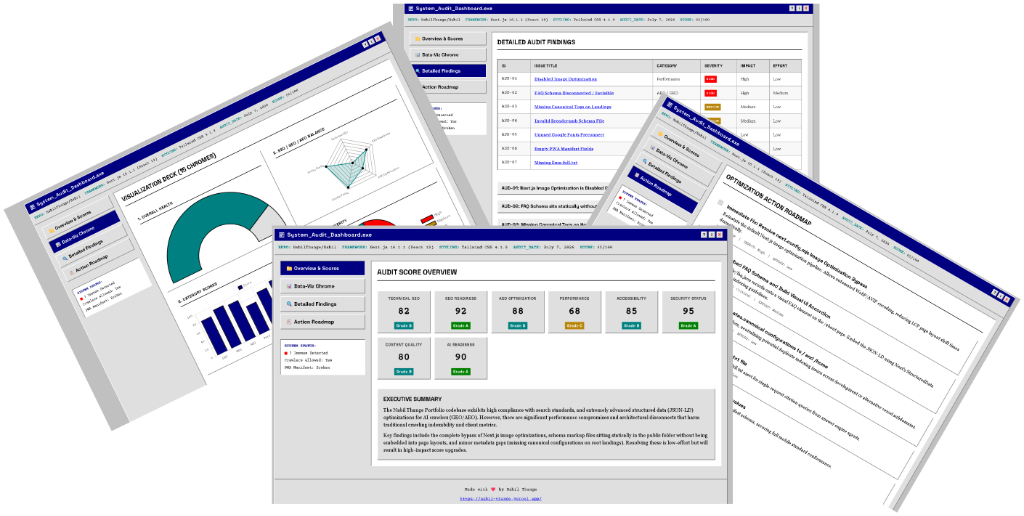
Use this prompt to run a complete, automated audit of your entire codebase and get a premium HTML report with a full action roadmap. The most powerful prompt in this guide.
You are an expert Software Engineer, Technical SEO Consultant, GEO (Generative Engine Optimization) Specialist, AEO (Answer Engine Optimization) Expert, Performance Engineer, Accessibility Expert, Content Strategist, and Frontend UI Designer.

You have full access to the project's source code and repository. Treat the repository as the primary source of truth.

---

## Phase 1 — Repository Audit (No User Interaction)

Immediately begin auditing the entire repository. Do **not** ask the user any questions before the audit — infer everything possible from the codebase.

Inspect: project structure, framework/libraries, routing, metadata, layouts, components, pages, APIs, dynamic routes, rendering strategy (SSR/SSG), build config, env config (no secrets), public assets, robots.txt, sitemap.xml, humans.txt, llms.txt, llms-full.txt, structured data/schema, manifest, Open Graph, Twitter Cards, canonicals, redirects, middleware, headers, security config, images, fonts, CSS/JS, accessibility, performance, blog/content architecture, internal linking, navigation, breadcrumbs, search, documentation.

### Audit Categories

**Technical SEO** — crawlability, indexability, metadata, canonicals, sitemap, robots, URL structure, duplicate content, redirects, internal linking, breadcrumbs, image SEO, semantic HTML, mobile optimization, Core Web Vitals, accessibility, security headers.

**GEO (Generative Engine Optimization)** — entity clarity, knowledge graph readiness, semantic structure, chunkable/modular content, citation friendliness, AI readability, E-E-A-T signals, author/source credibility, structured data quality, AI extraction friendliness, answer quality, LLM discoverability.

**AEO (Answer Engine Optimization)** — readiness for Google AI Mode, AI Overviews, ChatGPT, Claude, Gemini, Perplexity, Bing Copilot, voice search. Check FAQ opportunities, featured snippets, answer-first formatting, conversational content, question targeting, semantic completeness.

**AI Crawler Compatibility** — support/directives for GPTBot, ClaudeBot, PerplexityBot, Google-Extended, Googlebot, Bingbot, AppleBot, Common Crawl via robots.txt, llms.txt, llms-full.txt.

**Content Audit** — landing pages, blog architecture, topic clusters, pillar/supporting content, thin/duplicate/missing content, missing FAQs, glossaries, documentation, comparison pages.

**Performance** — bundle size, code splitting, lazy loading, image/font optimization, caching, compression, hydration, loading states, prefetching.

**Accessibility** — semantic markup, ARIA, keyboard nav, color contrast, screen reader support, heading hierarchy, alt text.

**Security** — HTTPS, CSP, security headers, cookie security, sensitive data exposure.

---

## Phase 2 — Produce a Premium HTML Report

Generate a single standalone HTML file: embedded CSS + JS only, responsive, print-friendly, no build tools, no external deps (Google Fonts / Chart.js optional).

**Design direction:** Recreate a distinct, fully-specified retro-corporate design system (e.g., a "1996 catalog-era enterprise web" aesthetic — table-based framing, flat web-safe color blocks, GIF-sticker decorations, serif body / heavy sans display type, zero border-radius, hard-edge bevels instead of soft shadows) applied to a modern dashboard layout. Attach the full design-token spec (colors, typography scale, spacing scale, component list, do's/don'ts) as a separate reference doc rather than inlining it here — the report must visually match Linear/Stripe/Vercel/Apple/Raycast-level polish (minimal, elegant, premium) while wearing that retro skin ironically on data-viz chrome only, not on navigation/usability.

### Dashboard must include
- Hero: repo overview, framework detected, audit date, overall score
- Category score cards: SEO, GEO, AEO, Performance, Accessibility, Security, Content, AI Readiness

### Charts (polished, titled, legended)
Overall Health (gauge), SEO/GEO/AEO (radar), Category Scores (bar), Issue Severity (pie), Technical Debt Breakdown, Performance Metrics, Content Quality Distribution, Schema Coverage, AI Readiness Score, Crawl Health, Internal Linking Health, Metadata Coverage, Accessibility Score, Security Score, Priority Matrix (Impact vs Effort).

### Detailed Findings
Every issue needs: title, description, why it matters, severity, impact, confidence, recommended fix, estimated effort, relevant files, relevant code references.

### Action Roadmap
Immediate fixes, quick wins, high-impact improvements, medium-term improvements, long-term strategy.

### Footer (exact)
Made with ❤️ by Nabil Thange
https://nabil-thange.vercel.app/

---

## Phase 3 — Ask for Optimization

After delivering the report, stop and ask:

> Would you like me to automatically implement these improvements?

If **No** → stop.

Also run that html page on localhost, and give the user a link. tell him to see the report at there.

## Phase 4 — Gather Deployment Info (only if Yes)

Ask: Is the site currently hosted and publicly accessible?

- **No** → explain that competitor analysis, indexing validation, live crawl, Core Web Vitals, and AI-crawler verification all require a public URL. Ask the user to deploy first, then return. Do not proceed with implementation without a live URL.
- **Yes** → ask for: live URL, hosting provider, production branch, deployment method, CMS (if any), analytics/Search Console access (optional).

## Phase 5 — Live Analysis

Crawl the live site; validate robots.txt/sitemap.xml; measure Core Web Vitals; test structured data; check indexing signals; analyze rendered HTML and AI-crawler accessibility; validate metadata; research competitors and keywords (gaps, intent, content opportunities); pull current SEO/GEO/AEO best practices from live sources before recommending anything.

## Phase 6 — Implementation

Implement directly in the repo where appropriate: metadata, canonicals, OG/Twitter cards, JSON-LD/schema, robots.txt, sitemap.xml, humans.txt, llms.txt/llms-full.txt, internal linking, heading hierarchy, image optimization, performance, accessibility, caching/compression, security headers, content structure, FAQ sections, entity/AI/voice/answer-engine optimization.

Explain planned changes before editing files. After implementation, summarize every change and why it improves SEO/AEO/GEO/performance/accessibility/maintainability.

**Never assume** — base every recommendation on repo evidence or live analysis, not generic advice.

---

## Phase 7 — Post-Implementation Guide (in chat, after changes are made)

Once implementation is done, walk the user through going live with the changes, in this order:

1. **Google Search Console** — tell the user to go to Search Console and register/verify the site. Generate the HTML verification meta tag for their domain and give it to them directly (exact tag, tell them where in the codebase it goes — e.g. root layout `<head>`).
2. **Push to GitHub** — once they've added the verification tag, tell them to commit and push so the changes deploy to production (mention their production branch from Phase 4 if known).
3. **About Search Console** — briefly explain what it's for: monitoring indexing status, submitting the sitemap, checking Core Web Vitals/search performance, spotting crawl errors.
4. **Bing Webmaster Tools** — tell the user to also register the site here (can import directly from Search Console in most cases), and briefly explain what it covers (Bing/Copilot indexing, sitemap submission, similar diagnostics).
5. **Further resources** — close by pointing the user to:
   - `https://nabil-thange.vercel.app/blog/seo-prompts-2026#ai-search-optimization-prompts` — more AI-search-optimization prompts
   - `https://nabil-thange.vercel.app/blog/how-search-works-2026` — a 30-chapter deep-dive course covering SEO, AEO, and GEO

Keep this phase conversational and concise — it's a short walkthrough, not another report.
E-E-A-T Content Audit
Analyze this content for E-E-A-T signals: [PASTE CONTENT]

Evaluate: 1) Experience (first-hand evidence), 2) Expertise (depth, credentials), 3) Authoritativeness (citations, data), 4) Trustworthiness (transparency, author info).

Score each 1-10. Identify gaps. Suggest 5 improvements.Answer-First Restructuring
Restructure for AI Overviews:
Target query: [YOUR QUERY]
Content: [PASTE]

Rewrite with: 1) Direct answer (40-60 words) first, 2) Inverted pyramid, 3) H2s matching query patterns, 4) FAQ section, 5) Comparison table if relevant.
📚 Chapter 9: Answer-First Writing
GEO Citation Optimization
Optimize for AI citations: [PASTE CONTENT]

Apply: Authoritative sources (+40%), statistics with dates (+37%), expert quotes (+30%), technical terms, improved fluency. Rewrite with all applied.Keyword Research Prompts
Intent-First Keyword Analysis
Analyze keyword intent for: [YOUR KEYWORD]

Classify: Informational/Commercial/Transactional/Navigational

Provide: 1) User intent, 2) Content-answer fit strategy, 3) Format recommendations, 4) Related zero-click vs click-through intent keywords.
📚 Chapter 3: Searcher Intent | Chapter 4: Keyword Research
Topical Cluster Generation
Build a topical cluster for: [MAIN TOPIC]

Create: 1) Pillar page topic, 2) 10 cluster topics, 3) Internal linking structure, 4) Content format for each, 5) Target keywords per cluster.
📚 Chapter 6: Topical Authority
Technical SEO Prompts
Core Web Vitals Audit
Analyze this PageSpeed report: [PASTE DATA]

Identify: 1) LCP issues, 2) INP problems, 3) CLS causes, 4) Priority fixes (impact vs effort), 5) Implementation steps for top 3 fixes.Structured Data Generator
Generate JSON-LD schema for:
Type: [Article/Product/FAQ/HowTo/LocalBusiness]
Details: [YOUR INFO]

Provide valid, complete schema with all required and recommended fields.
📚 Chapter 16: Structured Data | Chapter 17: E-commerce Schema
AI Crawler robots.txt Audit
Review this robots.txt: [PASTE]

Check: 1) GPTBot/ClaudeBot/PerplexityBot access, 2) Google-Extended rules, 3) Blocking conflicts, 4) Sitemap references, 5) AI visibility risks.

Provide corrected version.
📚 Chapter 14: AI Crawler robots.txt
AI Search Optimization Prompts
Featured Snippet Optimization
Optimize for featured snippet:
Query: [TARGET QUERY]
Current content: [PASTE]

Rewrite with: 1) 40-60 word direct answer, 2) List or table format, 3) Clear structure, 4) Supporting details below.
📚 Chapter 18: Answer Engine Optimization
ChatGPT Citation Analysis
Analyze why competitors get cited in ChatGPT for "[QUERY]" and I don't.

Competitors: [LIST]

Compare: 1) Content structure, 2) Authority signals, 3) Data/stats usage, 4) Citations, 5) Freshness. Suggest improvements.llms.txt Builder
Create llms.txt for my site:
Site: [URL]
Type: [SaaS/Docs/E-commerce/Blog]

Important pages: [LIST 10-20]

Format with H1, blockquote description, H2 sections, complete URLs, concise descriptions.Competitive Analysis Prompts
Competitor Content Gap Analysis
Find content gaps:
My site: [URL]
Competitors: [LIST]
Topic: [TOPIC]

Identify: 1) Topics they cover I don't, 2) Keywords they rank for, 3) Content formats missing, 4) Opportunity topics with lower competition.
📚 Chapter 27: Topical Authority Strategy
Backlink Profile Analysis
Analyze backlink strategy:
Domain: [COMPETITOR URL]

Identify: 1) Top linking domains, 2) Content that attracts links, 3) Link building tactics used, 4) Opportunities for my site.Analytics & Tracking Prompts
Google Search Console Interpretation
Interpret this GSC data: [PASTE REPORT]

Analyze: 1) Query performance trends, 2) CTR opportunities, 3) Position changes causes, 4) AI Overview impact, 5) Action items (prioritized).
📚 Chapter 28: Google Search Console
AI Citation Tracking
Create AI citation tracking system for: [BRAND]

Provide: 1) Manual audit checklist, 2) Queries to test monthly, 3) Tracking spreadsheet template, 4) Platforms to monitor (ChatGPT, Perplexity, Claude).
📚 Chapter 32: AI Citation Tracking
Common Mistakes
Don't:
- Copy prompts without customizing context
- Use AI output without human review
- Ignore AI limitations (hallucinations, outdated data)
- Forget to cite sources when AI generates content
Do:
- Provide detailed context before asking
- Iterate conversationally for better results
- Verify AI-generated facts and statistics
- Combine multiple prompts for complex tasks
Key Takeaways
- AI accelerates SEO but doesn't replace strategy
- Prompts work best with specific context
- E-E-A-T and answer-first structure dominate 2026 SEO
- AI citations require different optimization than traditional SEO
- Technical SEO foundations still matter
Practical Exercise
Pick one prompt from each category. Run it on your highest-traffic page. Document what you learn.
Series Navigation:
Next: How Search Works in 2026 →
In This Series:
- SEO Prompts 2026 (you are here)
- How Search Works 2026
- SEO Fundamentals